
Migrating a Linux Application
A C or C++ application written for Linux may depend on Linux-specific APIs, or use libraries that rely on them. To unlinuxify the application is to remove these dependencies, or to hide them behind an abstraction layer. After that, the code can run on any VEE Port, on any MCU or MPU, with or without an RTOS.
This page describes how to assess such an application and how to migrate it.
Porting Options
The usual way to port a Linux application to MICROEJ VEE is to compile its C or C++ code to a Wasm Module. The module then runs as Managed C. Most of the application code stays the same. The work is on the dependencies on Linux, if the application has any.
Handle each dependency on its own, with one of the options below. Try the options in the order of the table. The last option is different. You must use it when the feature is not supported.
Option |
When to Use |
Details |
|---|---|---|
Nothing to do |
The WASI Library or wasi-libc already provides the function. |
Step 3 |
wasi-libc emulation |
wasi-libc emulates a part of the feature (signals, process identifier, process clocks, memory mapping). |
Step 1 |
MicroEJ Managed C library |
MicroEJ provides a ported version of the library. |
Step 5 |
Java implementation |
MICROEJ VEE already offers the service in Java (networking, storage, user interface). |
Step 5 |
Abstraction layer |
The code must still build for Linux. |
Step 5 |
Change the C code |
The feature is not supported (process creation, C++ exceptions, CPU-specific routines, unsupported thread functions). |
Step 1, Step 3 |
Most applications use several of these options at the same time.
If too many dependencies need the options at the end of the table, a rewrite in Java can cost less. In that case, the C or C++ source shows the architecture to follow. MicroEJ libraries and services replace the Linux libraries that the application uses. A rewrite in Java can also give the smallest footprint, because it keeps only the functions that the product needs. This page does not describe the rewrite in Java. Step 4 helps you choose between Managed C and Java.
Assess the Application
Steps 1 to 3 give the numbers. Step 4 uses them to decide if Managed C fits the application.
Step 1: Compile to a Wasm Module
Build the application with the WASI SDK toolchain, not with the Linux toolchain. See Compiling your Project. The WASI SDK uses Clang/LLVM. So the work is usually the same as adding one more cross-compilation toolchain.
At this stage, the goal is a .wasm file, not a working application.
Use -Wl,--allow-undefined, so that the linker accepts the symbols that Linux provides.
See Linking a Wasm Module.
These undefined symbols are the dependencies that Step 2 lists.
Some Linux features have no equivalent in WASI. For a few of them, wasi-libc gives a partial emulation. This emulation is enough to compile and link the code:
Feature |
Compiler Option |
Linker Option |
Signals |
|
|
Process identifier |
|
|
Process clocks |
|
|
Memory mapping |
|
|
Warning
These options emulate only a part of the Linux behavior. Before you use an emulated function, read its wasi-libc source to see what it does.
POSIX threads need their own build options. See Enable WASI Threads.
Process creation is not supported.
wasi-libc does not declare fork or the exec functions.
So the compiler stops with an error like this one:
error: call to undeclared function 'fork'; ISO C99 and later do not support implicit function declarations
-Wl,--allow-undefined does not help, because this error occurs before the link step.
You must redesign the code that creates processes.
Step 2: List the Dependencies
Note
The WebAssembly Dependency Discoverer is available on request. Please contact our support team.
The WebAssembly Dependency Discoverer reads a .wasm file and reports what the module needs from its host.
It is a separate version of the Dependency Discoverer, which analyzes Java code.
It requires Python 3.10 or higher.
It also requires wabt 1.0.34 or higher in the system PATH.
Run it on the module from Step 1:
python -m microej.webassemblydependencydiscoverer --wasm-file my_app.wasm -o my_report.txt
If you built the module with WASI threads, give the threads option to wasm-stats, the wabt command that the tool runs:
python -m microej.webassemblydependencydiscoverer --wasm-file my_app.wasm -o my_report.txt -e=--enable-threads
The report has these sections:
WebAssembly total instructions: the number of instructions in the module.Extended WebAssembly instruction(s): the instructions that are not part of the WebAssembly core specification 1.0.Available extended WebAssembly instruction(s): the extended instructions that MICROEJ VEE implements. See Supported Instructions.Missing extended WebAssembly instruction(s): the extended instructions that MICROEJ VEE does not implement. The module cannot run until you remove them. Usually, a change to a compiler option removes them.WebAssembly imported function(s) list: the functions that the module expects from its host, with their module name and signature. Step 3 sorts this list.WebAssembly code section function(s) list: each function that the module defines, with its size in bytes.WebAssembly data section(s) list: each data segment, with its size in bytes.
The last two sections give the code footprint. Step 4 uses it for the complexity criterion.
Step 3: Sort the Dependencies
Each function in the import list belongs to one of the categories below. The category tells which porting option to use for that dependency.
Category |
Example Imports |
Option |
|---|---|---|
WASI system calls |
|
Nothing to do. The WASI Library implements them. |
POSIX threads |
|
Nothing to do for the pthread and semaphore functions listed in High-Level WASI-Based POSIX APIs. Change the C code to remove the other calls. |
Thread-local storage |
|
Nothing to change in the C code.
These imports appear when the link step does not get the |
C++ runtime |
|
Change the C code. C++ exceptions are not supported.
Remove |
Signals and processes |
|
Use the wasi-libc emulation from Step 1. Or change the C code to remove the calls. |
Memory mapping |
|
Use the wasi-libc emulation from Step 1.
Or change the C code to allocate with |
Linux device libraries |
|
There is no WASI equivalent. Use a MicroEJ Managed C library, a Java implementation, or an abstraction layer. See Step 5. |
CPU-specific routines |
|
This code is written by hand for one processor family. Change the C code to use the portable C version, or use a Java implementation. |
Count the imports that need work. Step 4 uses this count and the code size from the report.
Checking a Single Function
If wasi-libc defines a function, the linker puts it in the module, so it is not in the import list. If wasi-libc does not define the function, the function becomes an import. If the import stays in the module, the Java Application has to provide it (see Bind a Java Method with a Different Name). The other porting options can remove the import.
The WASI SDK has a list of the symbols that it defines. There is one file for each target:
[path_to_wasi_sdk]/share/wasi-sysroot/share/wasm32-wasi/defined-symbols.txt
[path_to_wasi_sdk]/share/wasi-sysroot/share/wasm32-wasi-threads/defined-symbols.txt
Use the file for the target of your module. Search it for the exact symbol name:
grep -x pthread_mutex_lock [path_to_wasi_sdk]/share/wasi-sysroot/share/wasm32-wasi-threads/defined-symbols.txt
For example, in WASI SDK 25, the wasm32-wasi-threads target defines 84 pthread_ functions.
pthread_mutex_lock, pthread_cond_wait and pthread_self are some of them.
It does not define pthread_setname_np or pthread_attr_setschedpolicy, so these two functions are imports.
Warning
If a symbol is in this list, the link succeeds. But the function may still not work at run time. A function that uses a Linux service still needs that service. Check its behavior in High-Level WASI-Based POSIX APIs.
Step 4: Decide Whether Managed C Fits
This step decides if a part of the application, or all of it, should move to Java instead of Managed C. Three criteria help to decide:
The number of dependencies that MICROEJ VEE does not support yet (Step 3).
The complexity of the application, which is its code size (Step 2) and its number of dependencies (Step 3).
The maturity of the application: whether it still changes, and how often. The steps on this page do not measure it. Judge it from what you know of the project.
Managed C fits an application with few unsupported dependencies, low complexity, and high maturity. A rewrite in Java fits an application with many unsupported dependencies, high complexity, and low maturity. Between these two cases, compare the cost of the migration with the footprint gain.
Often, the result is a mix. Keep as Managed C the parts with supported dependencies. Rewrite in Java the parts that depend on Linux services.
Migrate the Application
Step 5: Replace the Linux Dependencies
If the WASI Library and wasi-libc do not cover a dependency, you must provide it through another mechanism. This step describes three of the porting options.
MicroEJ Managed C library. MicroEJ provides ported versions of common C libraries, such as an XML parser, a JSON parser, an event loop, and a SQL database engine. The full list is in the ManagedC Libraries section of the MicroEJ APIs page.
Java implementation. You can bind an import of the Wasm Module to a Java method. The C code keeps its function call, and the Java Application provides the implementation. See Bind a Java Method with a Different Name. This is the usual way to use a service that MICROEJ VEE already offers in Java, such as networking, storage, or a user interface.
Abstraction layer. The application does not call the Linux library directly. It calls an interface that the application code defines. One implementation of this interface targets Linux, another targets WASI, and another targets a given RTOS or BSP. So one code base builds for Linux and for MICROEJ VEE. This option costs more than the two options above. Use it for a library that must also keep running on Linux.
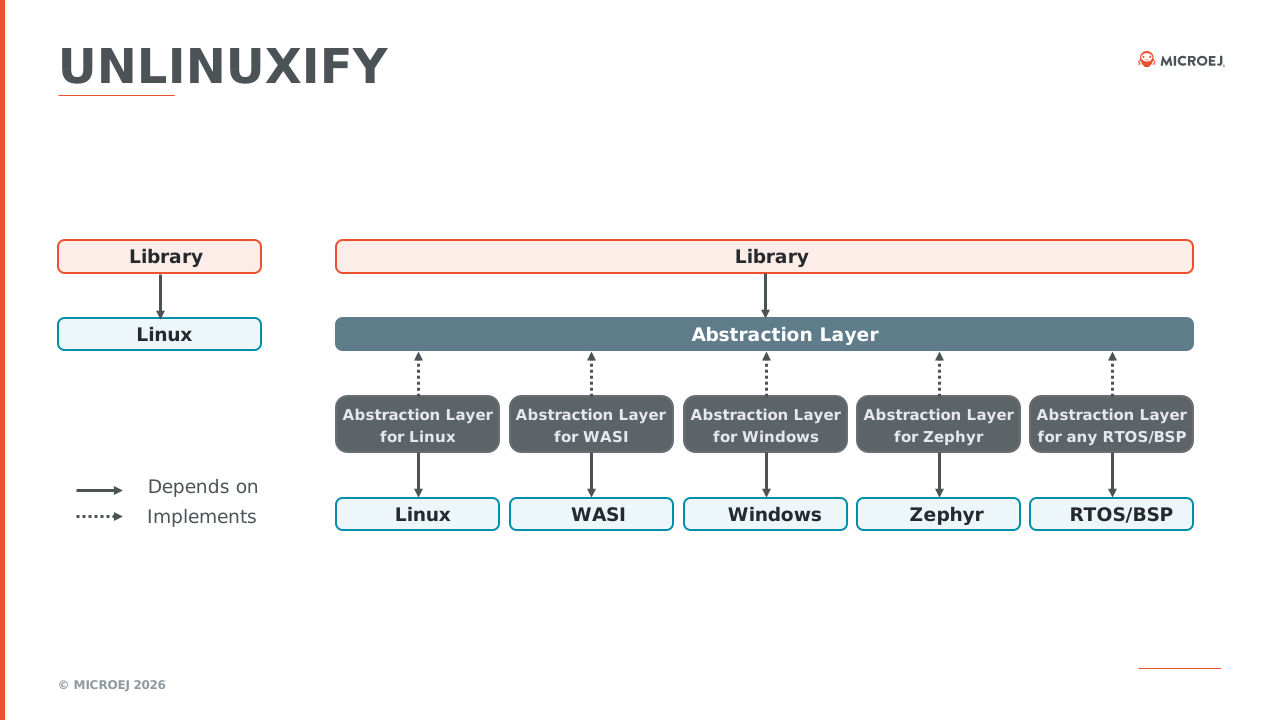
The abstraction layer replaces the direct dependency on Linux. It has one implementation per operating system.
Next Steps
To run the migrated module, see Getting Started.
To solve problems at build time or at run time, see Troubleshooting.