A Module Repository is a module that bundles a set of modules in a portable ZIP file.
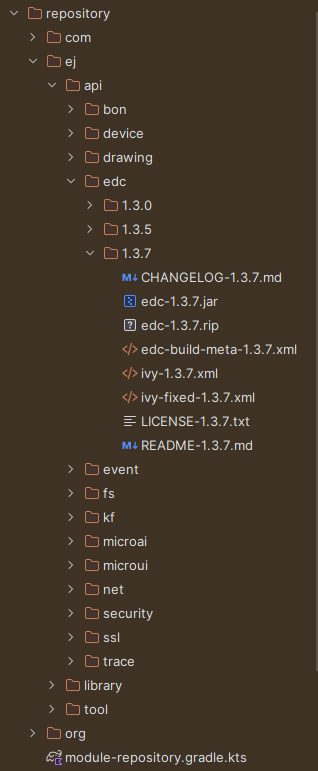
It is a tree structure where modules organizations and names are mapped to folders.
A Module Repository takes its input modules from other repositories, usually the MicroEJ Central Repository
which is itself built by MicroEJ Corp. as a Module Repository.
Modules bundled into the Module Repository must be declared as dependencies of the project. A dependency is declared with the microejModule configuration:
By default, a dependency is resolved transitively but it is possible to not fetch its transitive dependencies by specifying it in the dependency’s declaration:
When a dependency is not resolved transitively, you must either explicitly declare its transitive dependencies in your project,
or configure the Repository as a Partial Repository.
To ensure that repository users won’t have any resolution issues, a Module Repository Check is enabled by default.
Warning
Only Module dependencies are supported in a Module Repository project. To add a module available as project or included build,
you must first publish it to be able to add it to the repository.
A Partial Repository is a Repository which does not contain all the required modules.
It is designed to complete one or several other repositories.
For example, if you decide to use the MicroEJ Central Repository in addition to your custom Module Repository,
you can include only the modules not available in the MicroEJ Central Repository.
So if one module depends on edc, you can declare it with:
At resolution time, the my-lib dependency is resolved from the custom Module Repository and the edc library is resolved from the MicroEJ Central Repository.
To configure your Module Repository as a Partial Repository, you must create a file named module-repository.gradle.kts at the root of the Module Repository project.
This file must contain the list of repositories to use at resolution time.
So it should at least contain the custom Module Repository, and any additional Repository.
For example if you need to add the MicroEJ Central Repository, the file content should be:
pluginManagement{repositories{// Custom Module Repositorymaven{name="moduleRepositoryMaven"url=uri(buildscript.sourceFile!!.parentFile)}ivy{name="moduleRepositoryIvy"url=uri(buildscript.sourceFile!!.parentFile)patternLayout{artifact("[organisation]/[module]/[revision]/[artifact]-[revision](-[classifier])(.[ext])")ivy("[organisation]/[module]/[revision]/ivy-[revision].xml")setM2compatible(true)}}// MicroEJ Central Repositorymaven{name="microEJCentral"url=uri("https://repository.microej.com/modules")}ivy{name="microEJCentralIvy"url=uri("https://repository.microej.com/modules")patternLayout{artifact("[organisation]/[module]/[revision]/[artifact]-[revision](-[classifier])(.[ext])")ivy("[organisation]/[module]/[revision]/ivy-[revision].xml")setM2compatible(true)}}// MicroEJ SDK 6 repository for Maven/Gradle modulesmaven{name="microEJForgeSDK6"url=uri("https://forge.microej.com/artifactory/microej-sdk6-repository-release/")}// MicroEJ SDK 6 repository for Ivy modulesivy{name="microEJForgeSDK6Ivy"url=uri("https://forge.microej.com/artifactory/microej-sdk6-repository-release/")patternLayout{artifact("[organisation]/[module]/[revision]/[artifact]-[revision](-[classifier])(.[ext])")ivy("[organisation]/[module]/[revision]/ivy-[revision].xml")setM2compatible(true)}}}}dependencyResolutionManagement{repositories{// Custom Module Repositorymaven{name="moduleRepositoryMaven"url=uri(buildscript.sourceFile!!.parentFile)}ivy{name="moduleRepositoryIvy"url=uri(buildscript.sourceFile!!.parentFile)patternLayout{artifact("[organisation]/[module]/[revision]/[artifact]-[revision](-[classifier])(.[ext])")ivy("[organisation]/[module]/[revision]/ivy-[revision].xml")setM2compatible(true)}}// MicroEJ Central Repositorymaven{name="microEJCentral"url=uri("https://repository.microej.com/modules")}ivy{name="microEJCentralIvy"url=uri("https://repository.microej.com/modules")patternLayout{artifact("[organisation]/[module]/[revision]/[artifact]-[revision](-[classifier])(.[ext])")ivy("[organisation]/[module]/[revision]/ivy-[revision].xml")setM2compatible(true)}}// MicroEJ SDK 6 repository for Maven/Gradle modulesmaven{name="microEJForgeSDK6"url=uri("https://forge.microej.com/artifactory/microej-sdk6-repository-release/")}// MicroEJ SDK 6 repository for Ivy modulesivy{name="microEJForgeSDK6Ivy"url=uri("https://forge.microej.com/artifactory/microej-sdk6-repository-release/")patternLayout{artifact("[organisation]/[module]/[revision]/[artifact]-[revision](-[classifier])(.[ext])")ivy("[organisation]/[module]/[revision]/ivy-[revision].xml")setM2compatible(true)}}}}
This sample also includes the repository for the SDK 6 modules.
It is required if you haven’t declared it somewhere else (in your Gradle Init Scripts for example).
When a module is added as dependency of a Module Repository project, all its artifacts are fetched and added to the repository. However,
it is possible to select one artifact if you don’t want to add all of them by specifying its extension in the dependency’s declaration.
For example, to only fetch the Virtual Device of a Kernel, you must add the zip extension in the dependency:
You can also specify the name, type, extension or classifier of the artifact if they differ from the module. For example,
declare the following dependency to fetch the imageGenerator artifact of the UI Pack:
By default, the Production version of an Architecture is not included in a Module Repository.
You can specify to include the Production Architecture in the microej block of the build.gradle.kts file:
When a module is added as dependency of a Module Repository project, it is possible to define a list of its artifacts that must be excluded from the Repository.
You can specify the artifacts to exclude in the microej block of the build.gradle.kts file.
For example, the sources and javadoc Jar files of an Application can be excluded as follows:
The following artifacts can be excluded from the Module Repository using the excludeArtifacts method:
Name
Description
sources
Exclude the sources Jar file of a Java module.
javadoc
Exclude the javadoc Jar file of a Java module.
application-wpk
Exclude the WPK of an Application.
executable
Exclude the Executable of an Application.
To be noted that this artifact is not included by default, only the Stripped Executable is.
To include the Executable, the Stripped Executable must be explicitly excluded.
It is also possible to exclude both Executables by using the 2 values: executable,executable-stripped.
executable-stripped
Exclude the Stripped Executable of an Application.
virtual-device
Exclude the Virtual Device of an Application.
runtime-environment-api
Exclude the Runtime API jar file of a Runtime Environment.
evaluation-architecture
Exclude the Evaluation version of an Architecture.
Other types of artifacts cannot be excluded using the excludeArtifacts method. If you want to exclude a specific artifact of a dependency,
you must explicitly declare all artifacts of the dependency which must be included in the Repository.
Each dependency of a Module Repository project is resolved separately from the others,
so you can provide multiple versions of the same module by declaring each dependency with the same configuration. For example,
the versions of a Library can be provided with:
Most SDK 6 modules are published with an Ivy descriptor file to ensure that they can be consumed by SDK 5 projects.
By default, this file is not included in a Module Repository, but it is possible to add it by calling the withDependenciesIvyDescriptor method in
the microej block of the build.gradle.kts file:
microej{withDependenciesIvyDescriptor()}
Disable the Generation of the Maven Descriptor for SDK 5 Modules
SDK 5 modules are published with an Ivy descriptor only. A project that resolves them from a Maven repository has no descriptor to read,
so it cannot resolve them. To avoid this, the following files are generated by default for each SDK 5 module when the Module Repository is built:
<module>-<version>.pom
<module>-<version>.module, the Gradle Module Metadata
the .md5, .sha1, .sha256 and .sha512 checksum files of these two files
The generation can be disabled by setting the mavenDescriptorGenerationForIvyModulesEnabled property to false in the microej block of
the build.gradle.kts file:
The .pom and .module files of the SDK 5 modules are not generated.
These modules can only be resolved from an Ivy repository. The module-repository.gradle.kts script of the Module Repository
declares both a Maven and an Ivy repository, so a project which applies this script as described in the
Use an Offline Module Repository section still resolves them.
Their maven-metadata.xml file is still generated, but it lists no version, because a version is listed only when a .pom file
is available. A project which declares only a Maven repository and uses a dynamic version, for example 1.+, cannot resolve
these modules.
Note
The content of the Maven descriptor is derived from the ivy-<version>.xml descriptor of the module.
Nothing is generated in the following cases:
The module already provides a .pom file fetched from its source repository. This file is kept as is.
The type of the module cannot be determined from its Ivy descriptor. The artifacts and the Ivy descriptor of the module are still copied
in the Module Repository, so the module can still be resolved from an Ivy repository.
The recognized types are Architecture, Application, Firmware (single-application and multi-application), Add-On Library,
Foundation Library API, Foundation Library Implementation, Mock, Runtime Environment and Pack.
A maven-metadata.xml file listing the available versions is also generated for each module of the Module Repository,
whether it is an SDK 5 or an SDK 6 module.
The Module Repository check consists in verifying that each declared module can be fetched from the repository.
Especially, it ensures that all module’s transitive dependencies are also available.
For example, if your project provides the basictool library with isTransitive=false, the following error may be raised:
The Module Repository check can be run by executing the Gradle checkModuleRepository task:
./gradlewcheckModuleRepository
This task is executed by default when building a Module Repository.
It is also possible to disable the Module Repository for a dependency in the microej block of the build.gradle.kts file:
If you don’t want to check the Module Repository project, you can also skip the task.
The checkers supported by the checkModule task are also executed on all
dependencies of a Module Repository project by default. The checkers can be enabled or disabled on specific dependencies by calling
the following methods when declaring a dependency:
Name
Description
microej.runCheckers
This method takes a dependency and a comma-separated list of the names of the checkers to execute as parameters.
All checkers are executed by default.
microej.skipCheckers
This method takes a dependency and a comma-separated list of the names of the checkers to exclude as parameters.
Ignored if the dependency is also used as parameter of the runCheckers method.
It is possible to enable or disable the checkers of a dependency in the microej block of the build.gradle.kts file.
For example:
The properties provided by the checkModule task can also be used but they are applied on the project
itself, not its dependencies. For example, the Readme checker is skipped on the project but it is executed on the dependencies if the following
property is defined:
When the Module Repository has been created, you can configure your projects to use it:
Unzip the Module Repository archive at the location of your choice, for example in the C:\module-repository folder.
Apply the module-repository.gradle.kts script found in the Module Repository unzipped folder in the settings.gradle.kts file of your project to declare the repository: