
Serial
Note
This chapter describes the current Serial Foundation, provided by serial
pack version 3 or higher.
If you are using the former ECOM-COMM library, please refer to this MicroEJ Documentation Archive
Principle
The Serial Foundation Library provides support for serial port communication. It allows MicroEJ Applications to configure, receive and send data on serial links (typically UARTs or USB-CDC virtual ports).
The use of the Serial library in a VEE Port requires the implementation of an
abstraction layer that fulfills the Low Level API defined in
LLSERIAL_CONNECTION_impl.h.
Sequence model
The following steps describe the typical serial communication flow:
SerialConnection’s static initializer calls an initialization function in the abstraction layer to setup shared resources for serial communication (clocks, interrupts, etc.)
The MicroEJ Application opens a serial connection by creating a new
SerialConnectionwith a port name (e.g."COM1","/dev/ttyS1","lpuart7", etc.).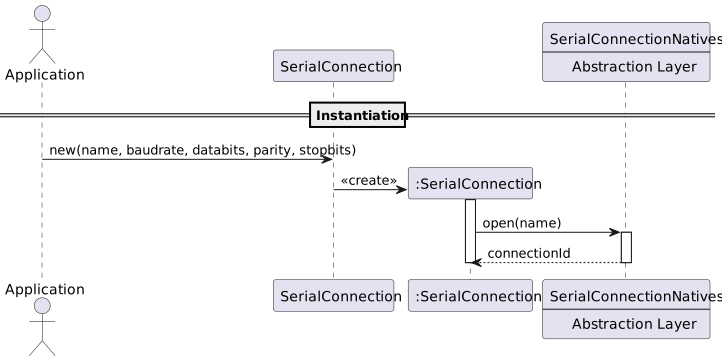
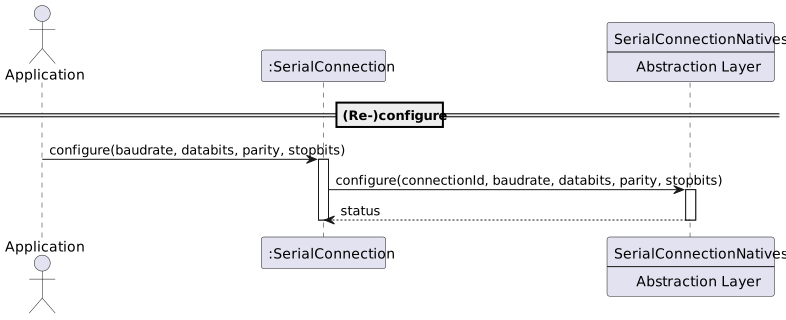
The connection is configured with line parameters: baud rate, data bits, parity and stop bits. The port may not need to be configured explicitly. For example, a virtualized COM over USB doesn’t need to be configured as there is no physical serial line. A VEE port could also be implemented to not let the application change the serial line parameters (e.g. a UART port is hardwired to an onboard chip with fixed settings).
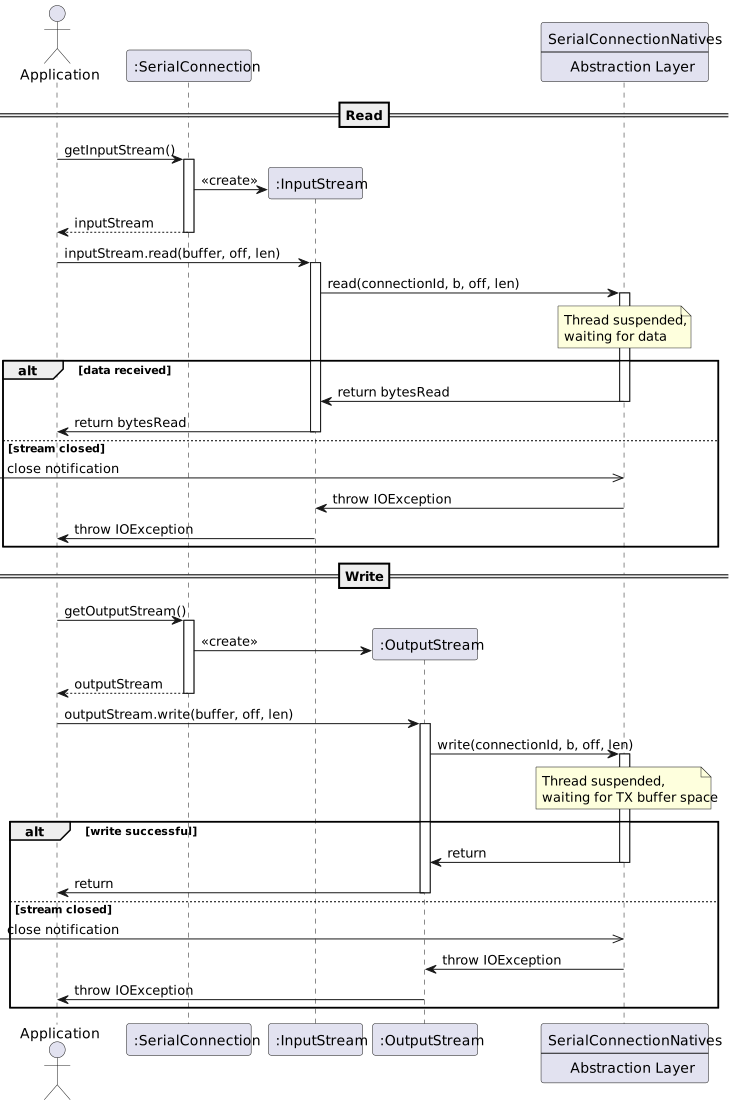
The application obtains an
InputStreamand/orOutputStreamfrom the connection for receiving and transmitting data respectively.Data is exchanged through the streams. Read operations are blocking: they wait until at least part of the requested data is available. Write operations are also blocking: they wait until all data has been passed to the transmitting layer (OS, BSP, etc.), blocking as needed.
When communication is complete, the application closes the connection (or the streams), which releases the underlying hardware resources.
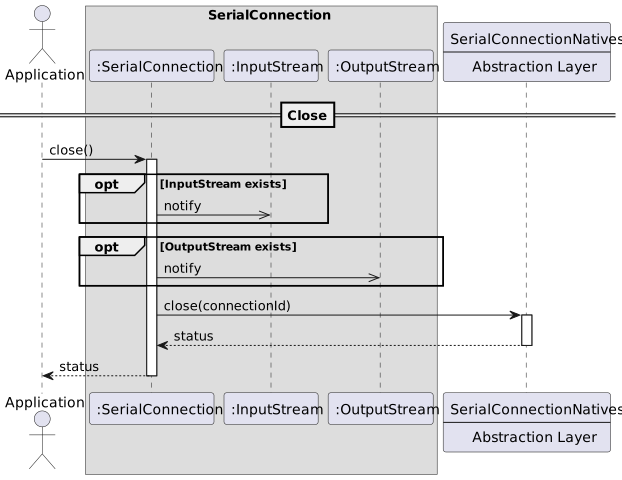
The Garbage Collector may also release the native resources if the owner
SerialConnectioninstance is destroyed.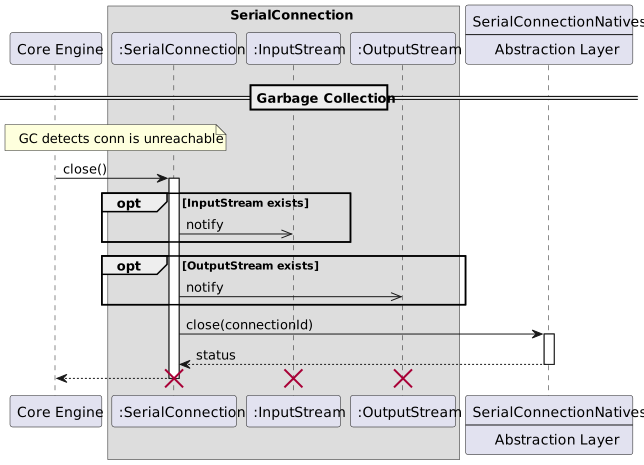
Abstraction layer porting guide
The API for the Serial abstraction layer, or driver, is defined in the header
file LLSERIAL_CONNECTION_impl.h. You must implement all the functions
declared in this header to provide serial communication support.
The details for the implementation of the abstraction layer are provided in doxygen comments in the header file. This guide provides high-level information on how to port it to your target.
Initialization
The Core Engine calls LLSERIAL_CONNECTION_IMPL_init() when the driver is
loaded to initialize the native serial stack. Use this function to initialize
hardware clocks, GPIO pins, interrupt controllers, or any other resources shared
across serial ports.
Open / Close native resources
Java instances of SerialConnection track native resources with an integer
identifier, referred to as connection ID, unique across all instances of
SerialConnection. The Java instance will allocate and release these
resources through two functions LLSERIAL_CONNECTION_IMPL_open() and
LLSERIAL_CONNECTION_IMPL_close().
Implement LLSERIAL_CONNECTION_IMPL_open():
to allocate and initialize all native resources required to communicate on the requested serial port, and track them under the connection ID.
to register the native resources as SNI resources in
LLSERIAL_CONNECTION_IMPL_open(). This allows the Core Engine to track native handles and free them should an unchecked exception cause the VM to crash.
Serial ports are identified by name. This name can be a path (like
/dev/ttyS1 on Unix-like systems) or an identifier (like COM2 on Windows,
or any other name of your choosing). You are responsible for naming each usable
port in your VEE Port. On high-level systems like Linux, you can delegate this
to the OS and return a file descriptor. If the target system doesn’t map serial
ports by name, you must implement such a mapping.
Implement LLSERIAL_CONNECTION_IMPL_close() to de-initialize and release the
resources registered under the connection ID, and unregister the SNI resource.
LLSERIAL_CONNECTION_IMPL_close() must be idempotent as it can be called by
the garbage collector after SerialConnection has been explicitly closed
(either by a try-with-resources or a call to SerialConnection.close())
Finally, implement LLSERIAL_CONNECTION_IMPL_getCloseFunction() to return a
pointer to your LLSERIAL_CONNECTION_IMPL_close() function. This is required
by the Java instance of SerialConnection to retrieve its registered SNI
resource which is uniquely identified by the pair {nativeId, closeFunction}.
Configure the serial line parameters
Not all serial connections require explicit line configuration. A USB-CDC
virtual COM port, for instance, has no physical line parameters to set. For
connections backed by a hardware UART or other physical serial interface
(RS232, RS422, RS485, etc.), implement LLSERIAL_CONNECTION_IMPL_configure()
to apply the requested baud rate, data bits, parity, and stop bits to the
peripheral.
The Java implementation validates the parameters before calling the driver, so
you do not need to filter out illegal parameters such as negative baud rate or
zero word length. However, LLSERIAL_CONNECTION_IMPL_configure() must throw
an adequate exception on error.
IO
read / write
Implement LLSERIAL_CONNECTION_IMPL_read() and
LLSERIAL_CONNECTION_IMPL_write() to transfer bytes to and from the serial
port.
From the point of view of the Java caller, these are blocking calls. They may
block depending on the state of the internal buffers. However, MicroEJ’s Core
Engine implements green threads,
which means that no other thread can run while the native method is blocked.
Since the throughput of a serial port is typically slower than a CPU by
multiple orders of magnitude, your implementations of
LLSERIAL_CONNECTION_IMPL_read() and LLSERIAL_CONNECTION_IMPL_write()
should NEVER block, at the risk of seriously degrading the performance of the
Core Engine (jitter, unresponsiveness).
When these functions would block, suspend the calling Java thread, register an SNI callback, and return. From the point of view of the Java caller, the native method is still blocked, but this lets the Core Engine run other threads while the driver waits for an event to resume the suspended thread.
Warning
Java objects, including byte arrays, may be relocated by the garbage
collector while the Core Engine runs other threads. Any buffer passed to
LLSERIAL_CONNECTION_IMPL_read() or LLSERIAL_CONNECTION_IMPL_write()
is only valid for the duration of the function call. Copy data out of the
buffer before suspending the calling thread.
Suspending the caller thread requires another mechanism to handle the transfer. The buffering strategy and implementation are entirely your choice; however, consider the following:
On high-level systems such as Linux, you can register blocked file descriptors with a watcher task using
select()orpoll()to resume the suspended thread. You can also spawn delegate tasks to handle the blocking IO and resume the suspended thread.On lightweight MCU systems, leverage hardware capabilities to achieve the best throughput and energy efficiency, such as DMA transfer with a circular buffer. Be wary of CPU time consumption and interrupt storms when using polling or naive interrupt-based implementation.
Number of available bytes
Implement LLSERIAL_CONNECTION_IMPL_available() to return the number of bytes
that can be read without blocking. To provide meaningful data to the
application, start receiving data continuously from the moment the serial port
is opened.
Flushing the output buffer
Strictly speaking, OutputStream.flush() guarantees only that bytes have been
passed from the Java buffering layer to the underlying system. This function
may return when all bytes have been flushed out of the abstraction layer.
If there is no buffering in your abstraction layer implementation, this function
does nothing. You only need to implement it if your implementation uses a
buffer. For example, on Linux, write() (from unistd.h) does NOT use
buffering in userspace. Data is forwarded directly to the kernel. However
fwrite() (from stdio.h) MAY use buffering, in which case you MUST
implement LLSERIAL_CONNECTION_IMPL_flush() to call fflush().
Should the call block, the same recommendations for implementing blocking
functions like LLSERIAL_CONNECTION_IMPL_read() also apply. There is no
requirement to wait for the bytes to be physically transmitted.
Note on exceptions
Any function of the driver may throw a NativeException. This is a subclass of RuntimeException, which means that this is an unchecked exception. Throw these when an unrecoverable error happens.
Some functions may throw NativeIOException. These exceptions indicate an IO error that the application must handle.
NativeIOException carries a numeric error code. The error codes accepted by
each native function and their mapping to Java exceptions are documented in the
doxygen comments of LLSERIAL_CONNECTION_impl.h.
This distinction is important for LLSERIAL_CONNECTION_IMPL_configure():
The application requested a configuration that this hardware will never support: throw a
NativeIOExceptionwith the error code defined for unsupported configurations. The Java layer promotes it to SerialConfigurationException, allowing the application to catch it and try a different configuration.The application requested a configuration that under normal circumstances should have worked but cannot be applied at the moment (for example, the clock that feeds the UART peripheral is stopped): throw a
NativeIOExceptionwith the generic I/O error code.
The testsuite uses this distinction: an unsupported configuration causes the test to be skipped, while a generic error causes the test to fail.
Installation
The Serial library is an additional Foundation Library.
microejPack("com.microej.pack.serial:serial-pack:3.0.0")
<dependency org="com.microej.pack.serial" name="serial-pack" rev="3.0.0" transitive="false"/>
Testing
The Serial Testsuite validates a Serial abstraction layer implementation against the SerialConnection API. It is built and run using the MicroEJ Testsuite Engine.
The testsuite requires two serial ports connected together: bytes written to the TX port must arrive on the RX port. See Running on Target below for setup details.
For more information on how to run testsuites, please refer to VEE Port Qualification Tools Overview.
Configuration
The testsuite reads the following system properties:
Property |
Required |
Description |
|---|---|---|
|
Yes |
Name of the RX serial port. |
|
Yes |
Name of the TX serial port. |
|
Yes |
Line parameters as |
|
No |
Buffer size in bytes for large transfer tests. Default: |
Running on Target
Connect the TX pin of one serial port to the RX pin of another (a crossed cable, a null-modem adapter, or two USB-to-serial adapters wired together all work).
Add the testsuite to the VEE Port:
microejTestsuite("com.microej.pack.serial:serial-testsuite:1.0.0")
<dependency org="com.microej.pack.serial" name="serial-testsuite" rev="1.0.0"/>
Set the system properties in the testsuite runner configuration, for example:
serial.port.rx=UART0
serial.port.tx=UART1
serial.port.config=115200-8-N-1