
Considerations for Developing a Kernel
This document outlines the topics to consider when designing a software architecture using MICROEJ VEE Multi-Sandbox capability.
Prerequisites
This document assumes that the reader is familiar with:
All the topics disucssed in this document assume that the VEE Port used to run the Kernel has the Multi-Sandbox capability enabled.
Glossary
- OTA
Over-the-Air (OTA) is a method for delivering updates to remote devices using a network connection.
- App(s) / Application(s)
Short for Sandboxed Application.
See also MicroEJ Glossary.
Application Installation Flow
This section outlines the considerations from application deployment to target memory installation.
Get familiar with Feature Installation before moving on.
The LLKERNEL_impl.h Low Level API provides a set of generic functions that the BSP must implement to manage memory allocation of dynamically installed Applications.
MicroEJ provides a reference implementation for each mode presented below:
For
Copy-to-RAM based execution, see AbstractionLayer-KERNEL-RAM.For
XIP - EXECUTE-IN-PLACE (FLASH), see AbstractionLayer-KERNEL-FLASH.
Contact us for custom implementation needs.
Communication Channel
Applications can be deployed on a Kernel as soon as a data stream of this application is provided to the Kernel, see KF Installation section.
Applications can be deployed using various communication channels such as BLE, mesh, TLS, or other communication protocols. These channels must ensure secure data transmission and support the required bandwidth for applications deployment.
Application Code Storage and Execution Strategies
Applications files (.fo) are managed differently depending on whether the hardware architecture supports
Execute-In-Place (XIP) or requires Copy-to-RAM execution.
The choice between these two methods impacts boot time, memory overhead, and system flexibility.
Copy-to-RAM Mode (Non-XIP)
In Copy-to-RAM mode, the application is stored in a non-volatile memory and executed from RAM memory.
This method is mandatory for systems with storage media that do not support direct CPU addressing (like SD cards, NAND Flash, or standard File Systems).
The diagram below shows typical application installation and execution flow in Copy-to-RAM Mode:
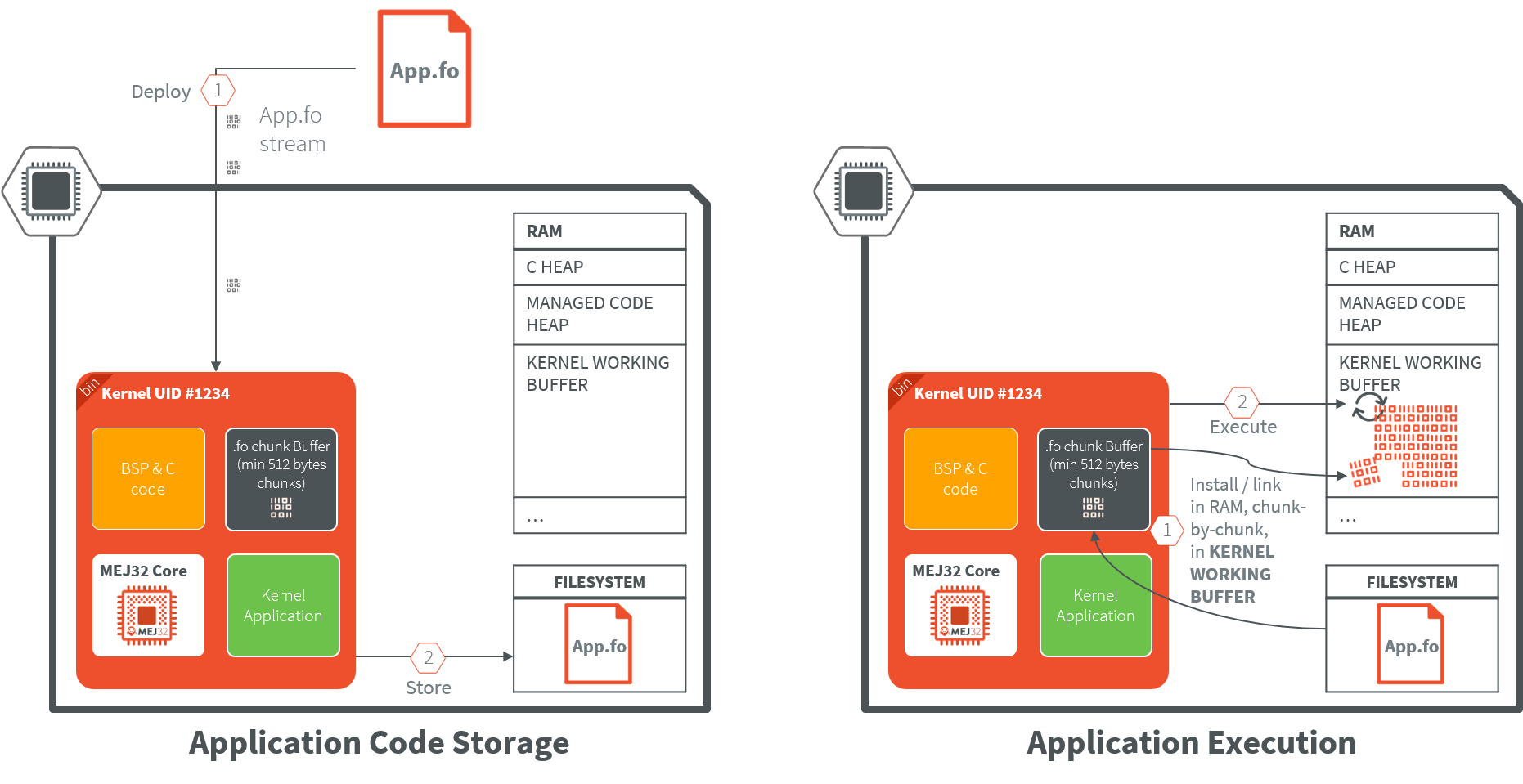
Deployment: The application file (
.fo) is stored as a persistent blob on a file system.Execution: Upon startup, the MicroEJ Core Engine allocates a block of RAM memory, and performs the application linking into it.
Best For: Systems with abundant RAM that require high-speed execution. Since RAM typically has lower latency and higher throughput than External Flash, code may run faster in this mode.
Constraint: The
.fofile must be kept on the device’s storage. Because RAM is volatile, the Core Engine must reinstall (re-copy) the application into RAM every time the device restarts.
XIP (Execute-In-Place) Mode
In XIP mode, the application is stored and executed directly from non-volatile memory (typically Internal Flash or QSPI/OctoSPI External Flash). This memory must be addressable by the CPU.
The diagram below shows typical application installation and execution flow in XIP (Execute-In-Place) Mode:
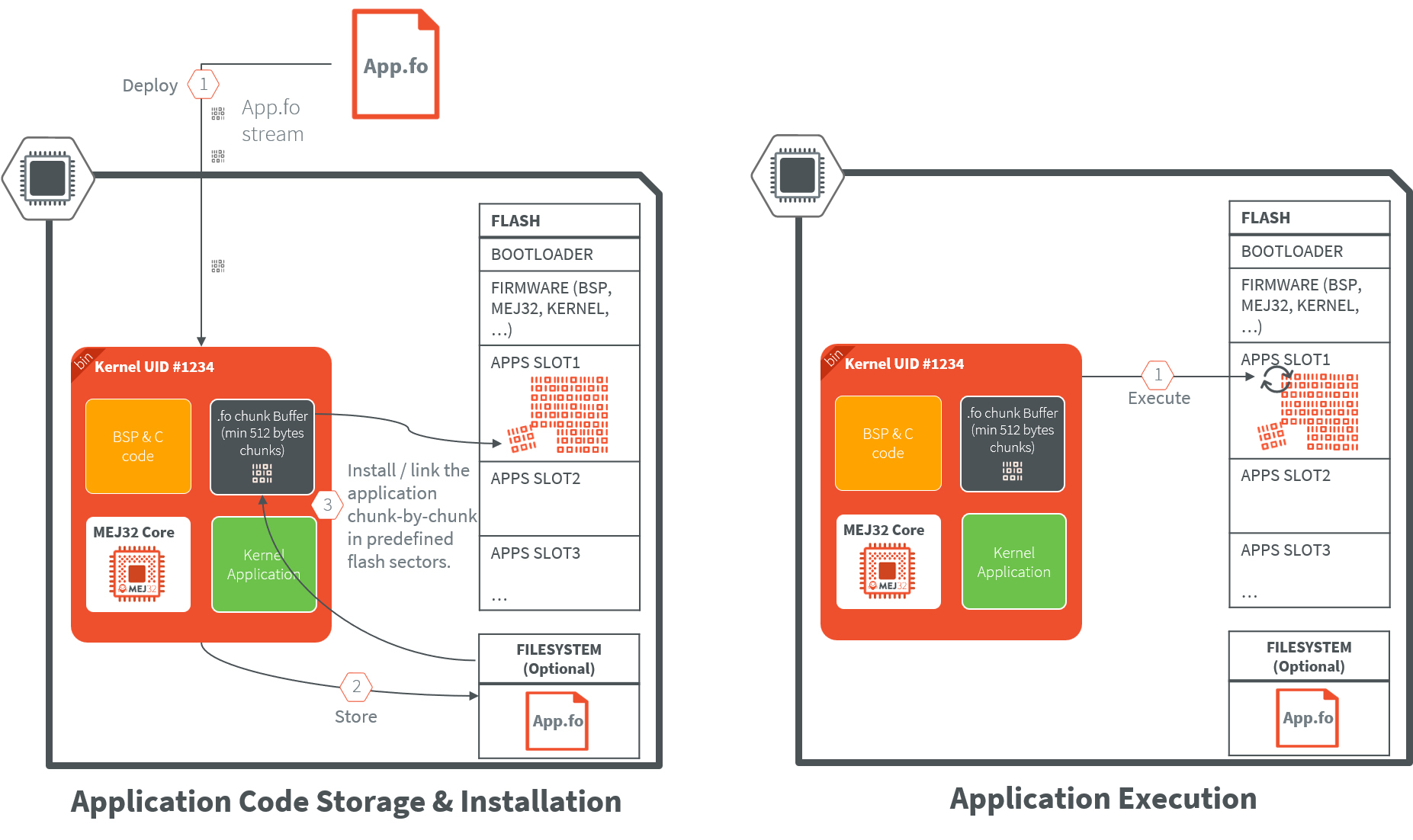
Deployment: The application file (
.fo) is stored as a persistent blob on a file system. It is then installed at a fixed execution address in the Flash memory map. Note that file system is optional in that case, the application can be directly installed in flash memory during deployment.Execution: The CPU fetches instructions directly from the Flash. Because the code is never moved, the original
.fofile is not required to be retained on a separate file system after installation.Best For: Devices with strictly limited RAM or systems requiring “Instant-On” performance, as there is no “copy-to-RAM” delay during the boot sequence.
Constraint: The code is linked to a specific physical address and cannot be relocated once installed.
Note
While storing the application.fo binary is not needed since it is installed in a non volatile memory,
it can still be useful to keep it in order to re-install it in different scenarios:
application update recovery, firmware/kernel update with feature portability, …
Application Compatibility
An Application is built over a Kernel (see Application Linking). The build output file of a Sandboxed Application against a Kernel is called a Feature, hence the f letter used in the extension name of the related files (.fso and .fo files).
.fso: application file which is a portable file that can be linked on any compatible Kernel (see FSO Compatibility). A Dynamic Linking On Device (.fso) is required before installing the application..fsois more suited for MPUs targets as it requires more RAM memory for the linking phase..fo: application file specific to a Kernel, result of an Off Board Build (.fo): it can only be installed on the Kernel it has been linked to.
By default, .fo files are used in the Multi-Sandbox evaluation flow as they easier to manipulate.
The Kernel is statically linked with the device Executable, in case of a Kernel update, an Executable update is required on the device.
It also implies to run re-build and re-deploy the application file (.fo) on the device,
unless the application has been built for the previous Kernel (see Feature Portability).
Note
If the Executable update is only a BSP update (C code or BSP memory layout), the application files (.fo) will remain compatible.
It is not necessary to re-deploy them.
Warning
After a firmware update, applications installed in Flash memory (XIP Execution) must be reinstalled.
In this scenario, you must uninstall the existing applications and reinstall them using their corresponding .fo files. To prepare for this:
Keep a local copy of all
.fofiles, orBe ready to rebuild and redeploy them.
Note that .fo files can be compressed on the device to reduce memory usage.
Preinstalled Applications
By default, the device firmware will only contain the Kernel and the BSP.
In some cases, the device should be delivered with pre-installed applications that could be critical system components that need to be available at all times without relying on dynamic deployment mechanisms.
To achieve that, either:
Deploy those applications on each device during the production phase.
Generate a factory firmware image containing those preinstalled applications. This approach requires to:
Flash and boot the initial firmware on the device (no pre-installed applications),
Put the Kernel in a “pre-production” mode and deploy the required applications,
Dump the flash memory of the device using a probe to get the firmware with pre-installed applications.
These preinstalled applications are loaded during system boot and are subject to the typical application lifecycle management.
Memory Layout
Memory layout — covering RAM/ROM, heaps, and stacks — must be planned carefully at build time through the Kernel and BSP configuration.
The Kernel statically defines system-wide maximums for the Managed Heaps, Threads/Stacks, and the number of applications that can be installed; these resources are shared globally across the Kernel and all running applications.
Beyond these static limits, the Kernel also provides runtime mechanisms to monitor and precisely control memory and stack usage on a per-application basis.
Refer to the Kernel Development training for more information on how to properly size your Kernel configuration.
Security
MicroEJ performs security checks at various levels from application build to execution on the target:
Build-time check: within MICROEJ SDK, the application bytecode is analyzed using the Binary Code Verifier during the build phase to guarantees its safe execution by the Core Engine.
Deploy-time check: MICROEJ SDK signs the application
.fofile before deploying it on the target. An on-device signature check is performed before installing the application.Startup-time check: the application integrity is checked before each startup on the device.
The Kernel Developer should consider the additional following security aspects:
Is the application binary encrypted before deployment on target?
How is secured the communication channel used for application deployment?
Kernel Services
The Kernel serves as the main entry point, which means it’s the central component that initializes and manages the entire system.
Ecosystem APIs
Ecosystem APIs (a.k.a Runtime Environment) are the set of APIs exposed to application developers. These APIs form the bridge between the Kernel functionalities and the application-level code that developers write.
These APIs must be carefully designed to provide controlled access to system resources while maintaining usability, security and stability.
Persistent Storage for Applications
Persistent storage is essential for maintaining application data, settings, and logging information across system restarts and power cycles.
A dedicated memory area should be allocated for this purpose.
The Storage library provides a key-value pair mechanism to easily store data on a FileSystem.
Runtime Policy
The runtime policy defines how applications are managed, secured, and executed within the Kernel environment.
Security Manager
Applications access rights management must be considered to prevent them from accessing unauthorized system resources. The SecurityManager allows to define Applications Security Policies at the Kernel level.
App Management
Application management is a core function of the Kernel that ensures proper resource allocation and system stability.
Resources Allocation: The Kernel defines statically a set of runtime policies using properties. Among them, how many threads an application can use at the maximum or how many applications can run at the same time.
Resources Monitoring: The Kernel must detect when an application consumes too much resources (memory, CPU, Network bandwith and FS max usage) to prevent system degradation. This monitoring capability is essential for maintaining system responsiveness and preventing applications from monopolizing system resources. See Resource Manager for more information.
Life Cycle Management: The Kernel manages the complete application lifecycle including installation, execution, and uninstallation processes:
Start-up Definition: Applications can have different startup behaviors based on policy requirements:
Automatic boot when installed: Some applications may be configured to start automatically upon installation,
Only “trusted” (“system” apps) ones at startup: “system” applications may be prioritized for automatic startup to ensure core system functionality,
Custom policy: customers can implement custom policies for application startup based on their specific requirements.
Fail-safe: The Kernel must implement fail-safe mechanisms when applications fail, to prevent system crashes or instability. These mechanisms might include automatic restarts, error logging, or graceful degradation of system functionality.
An example is provided in Kernel-GREEN KernelUncaughtExceptionHandler where the failing application are stopped and uninstalled.
Application Metadata: Application metadata is crucial for system management and user interaction (description, icons, version, …).
Metadata always accessible: Some metadata should be available regardless of application state. They can be stored on remote servers for centralized management, or stored locally when network connectivity is lost.
Metadata accessible when the application is installed or started: Other metadata may only be available when the application is installed or started:
Properties: Applications can retrieve runtime properties when they are started,
Resources: Application’s resources can be accessed using Feature.getResourceAsStream(“resource_path”) once the application is installed.
Application with GUI: The Kernel handles different types of applications based on their interface requirements:
Home Screen Management: for applications with user interfaces, the Kernel manages a home screen or dashboard that allows users to navigate between different applications.
Screen Sharing: multiple applications may share screen space simultaneously, requiring the Kernel to manage display priorities and allocation. See Physical Display Ownership for more information.
Kernel-Reserved Screen Area: some screen portions can be reserved for Kernel functions to ensure critical system information remains visible.
Communication Between Apps
Applications within the same Kernel environment need mechanisms to communicate and share resources effectively:
Shared Interfaces: This mechanism allows applications to define and implement interfaces that other applications can use for communication and data exchange.
Shared Services: Applications can register services that other applications can discover and use through a registry system, promoting loose coupling and modularity.
Warning
When working with Shared Interfaces, Kernel Types Converter must be considered.
If a new Converter is added to the Kernel; an Executable update is required (Kernel + BSP), as well as a new application installation cycle.
Remote Device Management
Remote management capabilities are essential for maintaining and updating applications in deployed systems.
LWM2M or other services: The Kernel supports remote management protocols like LWM2M (Lightweight Machine-to-Machine), DLMS or any other protocol management services for over-the-air updates and system monitoring. These protocols enable administrators to manage applications remotely, update Executable, and monitor system health without physical access to devices.
Limited Application Transfer Bandwidth
In environments with constrained communication capabilities, the Kernel must optimize the application data transfer.
Compress the .fo: The Kernel can retrieved compressed applications files (
.fo) to reduce bandwidth usage during transfers and decompress them during installation. Compression algorithms such asLZMA2orLZ4are well suited for embedded devices.Binary Diff with Previous One (bsdiff): The Kernel supports binary diff operations (using
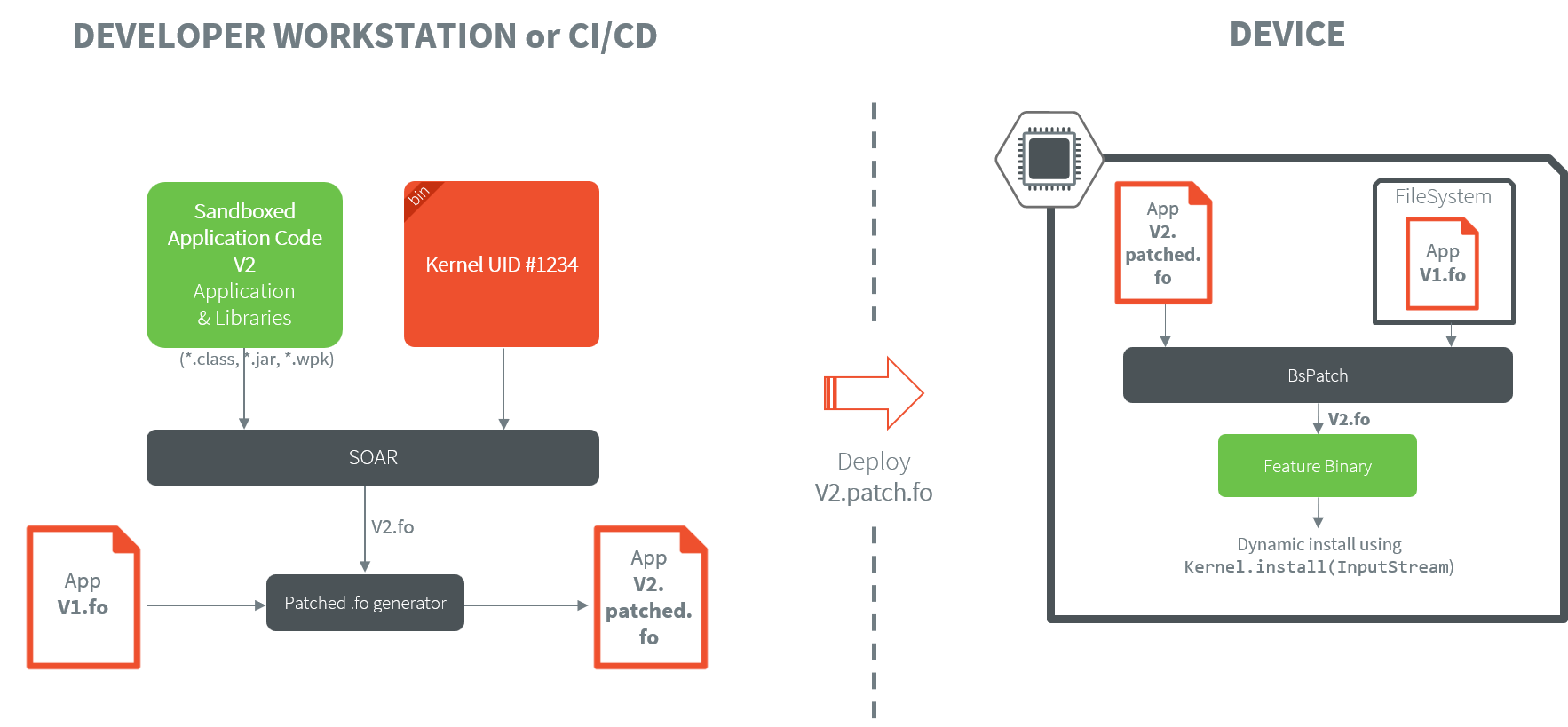
bsdiff) to only transmit changes between application files (.fo) versions rather than full file transfers. This significantly reduces bandwidth requirements and speeds up deployment processes. This mode assumes that the previous version of the application file (.fo) has been stored on the device beforehand.
The diagram below schematizes the flow when performing a differential application update. It assumes that:
A first version of the application has already been built and installed on the device (
V1.fo).V1.fohas been kept in memory on the device to perform the differential update.
Developer Mode
The Kernel should provide a developer mode that provides extended functionality for application developers, including:
Local deployment capabilities for rapid testing and iteration,
Advanced debug traces for detailed system monitoring,
Kernel CLI (Command Line Interface) for direct system interaction and configuration. As an example, refer to AppConnect Application Management.
This developer mode enables faster development cycles and more effective debugging while maintaining security for production deployments.
Opening Ecosystem to Third-Party Developers
In case of an open ecosystem, the Kernel ecosystem provider must define a process for accepting applications in its application store.
IP Considerations
To open applications development to 3rd parties, the Kernel ecosystem provider must provide a Virtual Device of the Kernel.
This Virtual Device allows 3rd parties developers to run applications on Simulator and deploy them on the device.
The Virtual Device is a package containing the Libraries, the Kernel, the pre-installed Application and all their transitive dependencies (.jar files).
No Executable is packaged in the Virtual Device, but it is available alongside it as another artifact when the Kernel Application is published in a Module Repository.
The SDK automatically fetches both the Virtual Device and the Executable of the Kernel when an Application is built on it to generate the .fo file.
It is also possible to provide a stripped version of the Kernel Executable,
which only contains entry symbols and metadata required for building the .fo files.
All the code sections are removed to prevent distribution of both MicroEJ and customer IPs.
The Virtual Device is a package containing source code and a stripped version of the Executable, avoiding Customer’s & MicroEJ’s IPs to be disclosed:
Libraries: contains an obfuscated version of Kernel binary, pre-installed apps and all their transitive dependencies (
.jarfiles), usingProguard. This prevent reverse engineering of customer’s Kernel managed code. This is optional and the level of obfuscation is configurable byProguard. For example, method names and line numbers can be kept as-is for simpler debug support.Stripped Executable: the device Executable is stripped using
MicroEJ ELF stripper tool, to keep only entry symbols and metadata required for building the.fofiles. All the code sections are removed to prevent distribution of both MicroEJ and customer IPs.
Customer SDK
When opening Sandboxed Application development to third parties, customers can distribute a Customer SDK — generated from MICROEJ SDK — containing everything a third-party developer needs to get started:
Kernel(s) & Virtual Device(s)
Ecosystem / Runtime APIs
Sample projects
Dedicated module repository
Application Moderation
When working with third-party application developers, the recommended workflow is:
The third-party developer submits a .wpk artifact — a packaged build of their application binary code — to the Kernel manufacturer.
The Kernel manufacturer builds the application binary file (.fo) from the .wpk against all the active Kernels and validate them on the devices.
This gives the Kernel manufacturer full control over what gets deployed on their devices.