
Simple Native Interface Specification (SNI)
Introduction
The Simple Native Interface specification (SNI) defines how to cross the barrier between the Managed world and the native world:
Call a C function from Java code.
Pass parameters to the C function.
Return a value from the C world to the Managed world.
Manipulate (read & write) shared memory both in Java and C code: the immortal space.
Note
In the following explanations, the term task refers to native tasks scheduled by the underlying OS or RTOS, while thread refers to MicroEJ threads scheduled by the Core Engine.
The sections below also mention some functions from the SNI native API. See here for the complete SNI Native API reference: SNI Native API.
Specification Summary
Java APIs |
|
Latest Version |
1.4 |
Module Dependency |
implementation("ej.api:sni:1.4.3")
<dependency org="ej.api" name="sni" rev="1.4.3" />
|
Module Location |
First Example
This first example shows how to declare and implement a Java native
method using SNI. First the method has to be declared native in Java code:
this states that the method is written in another language.
package example;

import java.io.IOException;

/**
 * Abstract class providing a native method to access sensor value.
 * This method will be executed out of the Core Engine.
 */
public abstract class Sensor {

    public static final int ERROR = -1;

    public int getValue() throws IOException {
        int sensorID = getSensorID();
        int value = getSensorValue(sensorID);
        if (value == ERROR) {
            throw new IOException("Unsupported sensor");
        }
        return value;
    }

    protected abstract int getSensorID();

    public static native int getSensorValue(int sensorID);
}

class Potentiometer extends Sensor {

    protected int getSensorID() {
        return Constants.POTENTIOMETER_ID; // POTENTIOMETER_ID is a static final
    }
}
Then, the implementation of the method is written in C language.
   // File providing an implementation of native method using a C function
   #include <sni.h>
   #include <potentiometer.h>

   #define SENSOR_ERROR (-1)
   #define POTENTIOMETER_ID (3)

   jint Java_example_Sensor_getSensorValue(jint sensor_id){

       if (sensor_id == POTENTIOMETER_ID)
       {
           return get_potentiometer_value();
       }
       return SENSOR_ERROR;
   }
Java code and C Execution Sequence
Calling C from Java
When a Java native method executes, it executes its C counterpart function. This is done using the CPU budget of the task that has started the Core Engine. While the C function executes, no other Java method executes and the Core Engine cannot schedule other threads. The Managed world “waits” for the C function to finish.
The following illustration shows the execution of the Core Engine task.
Green thread 3 has called a native method that executes in C.
All Java activity is suspended until the C execution has finished.
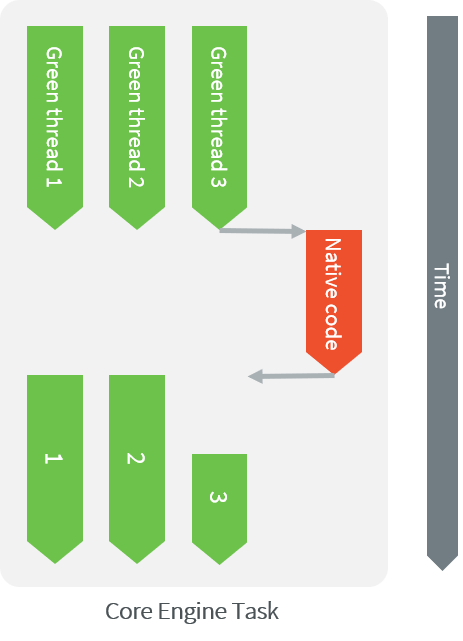
Execution of Threads by the Core Engine Task
Synchronization
SNI defines C functions that provide controls for the threads activities:
int32_t SNI_suspendCurrentJavaThread(int64_t timeout): Suspends the execution of the thread that initiated the current C call. This function does not block the C execution. The suspension is effective only at the end of the native method call (when the C call returns). The thread is suspended until either an task callsSNI_resumeJavaThread, or the specified number of milliseconds has elapsed.int32_t SNI_getCurrentJavaThreadID(void): Permits retrieval of the ID of the current thread within the C function (assuming it is a “native Java to C call”). This ID must be given to theSNI_resumeJavaThreadfunction in order to resume execution of the thread.int32_t SNI_resumeJavaThread(int32_t id): Resumes the thread with the given ID. If the thread is not suspended, the resume stays pending.
The following illustration shows Green thread 3 which has called
a native method that executes in C. The C code suspends the thread after
having provisioned its ID (e.g. 3). Another task may later resume the thread.
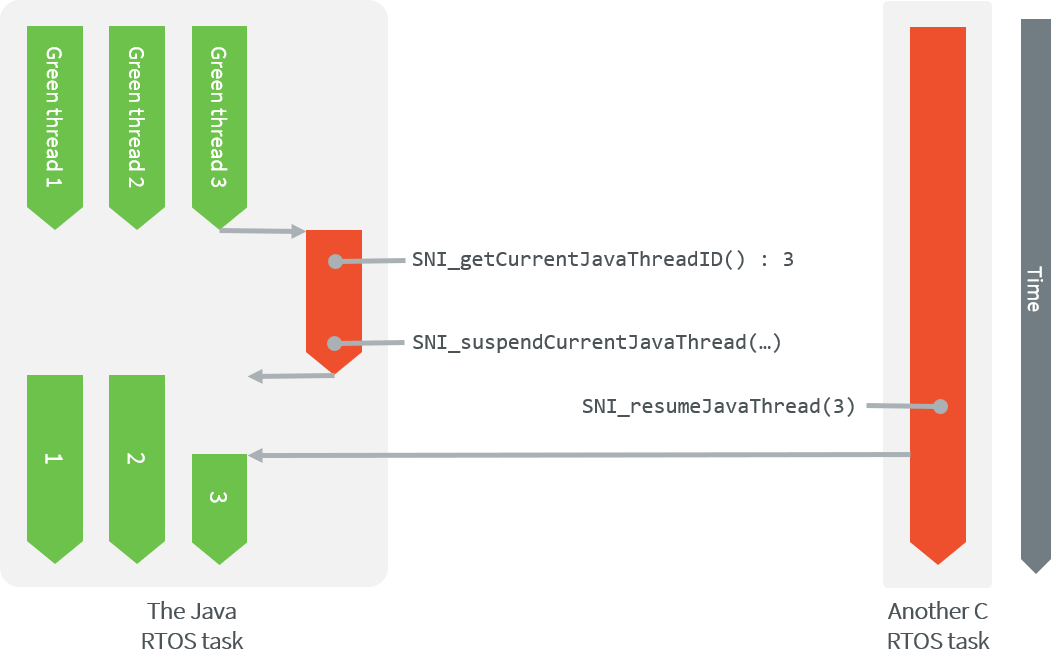
Green Threads and Task Synchronization
Java And Native Separation
The following illustration shows both Java code and C code accesses to shared objects in the immortal space, while also accessing their respective memory. In C code, non-immortal arrays can only be accessed within the local scope of a native function.
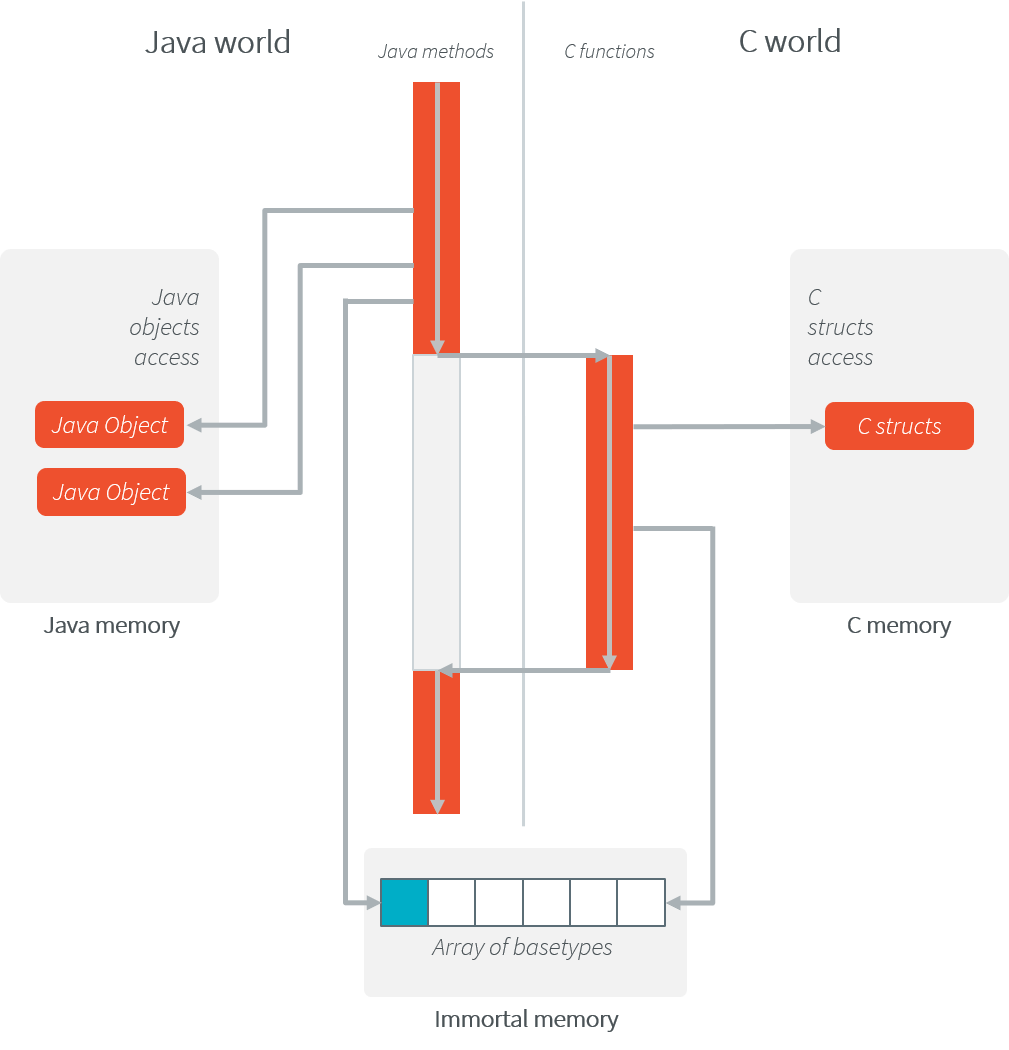
Java code and C shared objects
Managed World to C World
C Function Call From Managed World
The SNI specification allows the invocation of methods from Java to C: these
methods must be declared static native methods, and the parameters must be
base types or array of base types.
These native methods are used in Java code as standard Java methods.
Example:
package example;
public class Foo{

   public void bar(){
      int times = 3;
      print(times);
   }

   public static native void print(int times);
}
#include <sni.h>
#include <stdio.h>

void Java_example_Foo_print(jint times){
   while (--times >= 0){
      printf("Hello world!\n");
   }
}
Java Types And C Types
Base Types
Types may have different representations depending on the language. The
file sni.h defines the C types that represent exactly the Java types.
Java Type |
Specification |
C type |
|---|---|---|
void |
No returned type |
|
boolean |
unsigned 8 bits |
|
byte |
signed 8 bits |
|
char |
unsigned 16 bits |
|
short |
signed 16 bits |
|
int |
signed 32 bits |
|
long |
signed 64 bits |
|
float |
IEEE 754 single precision 32 bits |
|
double |
IEEE 754 double precision 64 bits |
|
Java Array
The Java arrays (of base types) are represented in C functions as C arrays: the array is a pointer on the first element of the array, all the elements in line within the memory.
SNI allows to get a Java array length in a C function.
int32_t SNI_getArrayLength(void* array);
Strings
Strings are typically represented quite differently between C & Java code.
In C, strings are represented with C char (8-bit) array with a
'\0' as last character. In Java code, strings are jchar (16-bit) array, not
terminated by '\0'.
To help with the conversion, the SNI Java API provides utility methods to convert between the two representations.
Example:
package example;
public class Foo {

    private static final int MAX_STRING_SIZE = 42; // including the '\0' character

    public void pushString(String str) {
        pushString(SNI.toCString(str));
    }

    public String pullString() {
        byte[] buffer = new byte[MAX_STRING_SIZE];
        pullString(buffer);
        return SNI.toJavaString(buffer);
    }

    private static native void pushString(byte[] str);
    private static native void pullString(byte[] buffer);

}
#include <sni.h>
#include <string.h>

#define MAX_STRING_SIZE 42

static char gStr[MAX_STRING_SIZE];

void Java_example_Foo_pushString(jbyte *str) {
    strncpy(gStr, (char*) str, MAX_STRING_SIZE);
}

void Java_example_Foo_pullString(jbyte *buffer) {
    strncpy((char*) buffer, gStr, MAX_STRING_SIZE);
}
Note
The string conversions use the default platform encoding. To use a different encoding, refer to the String API.
Naming Convention
SNI uses a naming convention to name-match the Java native method with its C counterpart function.
The C function name is the concatenation of the following components:
the prefix “
Java_”.the package name of the class, each sub packages is separated with “
_”.the separator “
_”.the class name.
the separator “
_”.the method name.
If the method is overloaded by another method, native or not (the two methods have the same name with different arguments), the function name must be followed by the arguments descriptor, obtained with the following components (except if the method has no arguments):
the separator “
__” (two underscores)the name of each argument type, without separator, preceded by “
_3“ if it is an array.
The following table gives the descriptors of the Java types for arguments.
Java type |
SNI name |
|---|---|
boolean |
Z |
byte |
B |
char |
C |
short |
S |
int |
I |
long |
J |
float |
F |
double |
D |
The character underscore (“_”) is used as a separator in the
name. If this character is used within the Java name (either in package,
class name or method name), it is replaced with “_1”. Because the
Java names cannot start with a number, the characters “_1” cannot
be confused with separator character.
Examples of Java native methods and their counterpart C functions:
package example.sni.impl;

class Hello {

    public static native void nativ01(int i);
    public static native void nativ02(boolean b, int[] i);
    public static native void nativ_03();
    public static native void nativ04();
    public static native void nativ04(long l, double d);
    public static native void nativ04(int[] ia, int ib, char[] ca);

}
void Java_example_sni_impl_Hello_nativ01(jint i);
void Java_example_sni_impl_Hello_nativ02(jboolean b, jint* i);
void Java_example_sni_impl_Hello_nativ_103();
void Java_example_sni_impl_Hello_nativ04();
void Java_example_sni_impl_Hello_nativ04__JD(jlong l, jdouble d);
void Java_example_sni_impl_Hello_nativ04___3II_3C(jint* ia, jint ib, jchar* ca);
Parameters Constraints
There are strong constraints on arguments given by Java methods to native functions:
Only base types and array of base types are allowed in the parameters. No other objects can be passed: the native functions cannot access Java objects field nor methods.
When base type arrays are passed in parameters, they must have only one dimension. No multi dimension array are allowed (
int[][]is forbidden for example).Only base types are allowed as return type.
This constraints are checked at link-time to ensure that they are respected.
Startup
The Core Engine needs first to be initialized, and then started. It is the programmer responsibility to create a task and to start the Core Engine within this task.
SNI defines C functions to create a Managed world, to start it and to free it:
void SNI_createVM(void): creates and initializes the Core Engine context.int32_t SNI_startVM(void,int32_t,char): starts the Core Engine. This function returns when the Java application ends.int32_t SNI_getExitCode(void vm): gets the Java application exit code, afterSNI_startVMhas successfully returned. This is the value passed by the application to System.exit() method.void SNI_destroyVM(void vm): does nothing if the Core Engine is still running. This function must be called in the task that created the Core Engine.
The following illustration shows a typical example of Core Engine startup code.
void microej_main(int argc, char **argv) {
   void* vm;
   int core_engine_error_code = -1;
   int32_t app_exit_code = 0;

   vm = SNI_createVM();
   if (vm == NULL) {
      printf("MicroEJ initialization error.\n");
   } else {
      core_engine_error_code = (int)SNI_startVM(vm, argc, argv);
      if (core_engine_error_code < 0) {
         printf("MicroEJ execution error (err = %d).\n", (int) core_engine_error_code);
      } else {
         app_exit_code = SNI_getExitCode(vm);
         printf("MicroEJ END (exit code = %d)\n", (int) app_exit_code);
      }
      SNI_destroyVM(vm);
   }
}
Resources
SNI provides a mechanism for registering native resources (e.g., buffers or data structures declared in the native code that need a longer lifetime than the native function in which they are initialized).
This SNI mechanism allows binding a native resource to the calling Application so that the Application can manage its closure.
The native resource is also closed when a Standalone Application (Mono-Sandbox context) or a Kernel (Multi-Sandbox context) exits.
This closing happens before the Core Engine returns from SNI_startVM() (see Startup).
In the case of a Sandboxed Application, this is when the Application is being stopped (or when the Kernel exits).
Note
The Core Engine state dump lists the registered native resources.
In most cases, the library provides a “close” method in its API (implemented with a native “close” method) so that the Application can explicitly close the native resource.
Typically, the API provides a class that reifies this native resource and implements AutoCloseable.
When the API does not contain a “close” method, it is possible to bind a native resource to a Managed object (typically a Java object) using NativeResource.closeOnGC(). In this case, the native resource will be closed when the bound object is Garbage-Collected. This Garbage-Collection mechanism can be used in addition to the “close” method as a safeguard to prevent memory leaks if the “close” method is not called.
See the API reference for SNI_registerResource() and SNI_unregisterResource().
Scoped Resources
SNI also provides scoped resources. In this case, the scope of the resource is the native call.
It can be used to share a resource between a native function implementation and a callback (see SNI_suspendCurrentJavaThreadWithCallback()).
The resource will be closed when the native call returns (after the native function and the potential successive suspend/resume callbacks return), or after
the calling Application is terminated (before the suspended native call is completed).
See the API reference for SNI_registerScopedResource() and SNI_unregisterScopedResource().
Note
Only 1 scoped resource registered at a time is supported per native call.
Typical use cases
A typical SNI use case is for the Managed Code to maintain a reference to a C object (typically a pointer to a struct).
For example, here is a struct:
typedef struct point {
    int x;
    int y;
} point_t;
To keep a reference to an instance of the struct, we typically use a handle: a 64-bit pointer stored as a jlong.
Then, the handle is passed as an argument to the different native methods that will use the object, either to manipulate the struct directly,
or pass it as an argument to another C (library) function.
The handle is cast to a 32-bit pointer in the native functions on 32-bit platforms.
package example.sni;

import ej.sni.NativeResource;

class Point implements AutoCloseable {

    private long handle;

    private static final int HANDLE_STATE_CLOSED = -1;
    private static final String MESSAGE_HANDLE_STATE_CLOSED = "Point is closed";

    public Point(int x, int y) {
        // Create the native resource
        this.handle = PointNatives.createPoint(x, y);
        // This is a safeguard. The native resource will be closed when "this" will be Garbage-Collected.
        NativeResource.closeOnGC(this.handle, PointNatives.getCloseFunctionHandle(), this);
    }

    public synchronized int getX() {
        checkHandleNotClosed();
        return PointNatives.getX(this.handle);
    }

    public synchronized int getY() {
        checkHandleNotClosed();
        return PointNatives.getY(this.handle);
    }

    public synchronized void setX(int x) {
        checkHandleNotClosed();
        PointNatives.setX(this.handle, x);
    }

    public synchronized void setY(int y) {
        checkHandleNotClosed();
        PointNatives.setY(this.handle, y);
    }

    @Override
    public synchronized void close() {
        checkHandleNotClosed();
        // No need to call NativeResource.clearCloseOnGC here because SNI_unregisterResource will be called in the native function.
        PointNatives.deletePoint(this.handle);
        this.handle = HANDLE_STATE_CLOSED;
    }

    private void checkHandleNotClosed() {
        if (this.handle == HANDLE_STATE_CLOSED) {
            throw new IllegalStateException(MESSAGE_HANDLE_STATE_CLOSED);
        }
    }
}

class PointNatives {

    static native long createPoint(int x, int y);

    static native void deletePoint(long handle);

    static native long getCloseFunctionHandle();

    static native int getX(long handle);

    static native int getY(long handle);

    static native void setX(long handle, int x);

    static native void setY(long handle, int y);

}
#define point_create            Java_example_sni_PointNatives_createPoint
#define point_delete            Java_example_sni_PointNatives_deletePoint
#define point_get_delete_fn     Java_example_sni_PointNatives_getCloseFunctionHandle
#define point_get_x             Java_example_sni_PointNatives_getX
#define point_get_y             Java_example_sni_PointNatives_getY
#define point_set_x             Java_example_sni_PointNatives_setX
#define point_set_y             Java_example_sni_PointNatives_setY

static void point_close(void* point) {
    free(point);
}

jlong point_create(jint x, jint y) {
    point_t* point = malloc(sizeof(point_t));
    point->x = x;
    point->y = y;
    SNI_registerResource((void*)point, (SNI_closeFunction)point_close, NULL);
    return (jlong) point;
}
void point_delete(jlong handle) {
    void* point = (void*)handle;
    SNI_unregisterResource(point, (SNI_closeFunction)point_close);
    point_close(point);
}
jlong point_get_delete_fn(void) {
    return (jlong)point_delete;
}
jint point_get_x(jlong handle){
    point_t *point = (point_t*)handle;
    return (jint)point->x;
}
jint point_get_y(jlong handle){
    point_t *point = (point_t*)handle;
    return (jint)point->y;
}
void point_set_x(jlong handle, jint x){
    point_t *point = (point_t*)handle;
    point->x = x;
}
void point_set_y(jlong handle, jint y){
    point_t *point = (point_t*)handle;
    point->y = y;
}
Comments
Your comments about this specification are welcome. Please contact our support team with “SNI” as subject.