
Bind Java code and Managed C Code
The Core Engine features a direct connection between Java code and Managed C code through a
bidirectional binding between Java methods and Managed C functions.
Also, the Java code can directly access the Managed C linear memory via the getMemory() method
inherited from WasmModule.
Principle
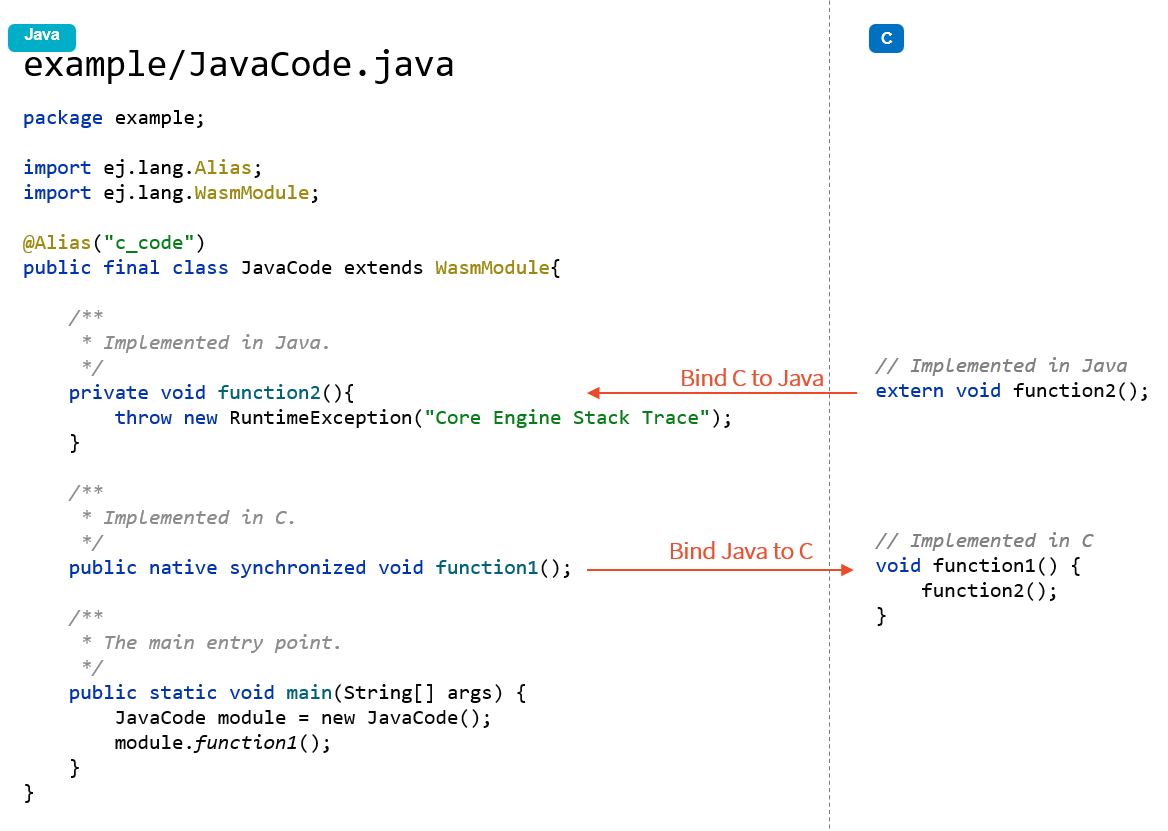
The following figure illustrates the binding between Java methods and C functions through a first code example.
Basically, a Java instance method declared as native is bound to a Managed C function with the same name.
Conversely, a Managed C function declared as extern is bound to either a Java instance method of
the same WasmModule subclass, or to a static Java method of any class.
Here is a first example:
The next figure illustrates the call stack of the Core Engine main thread:
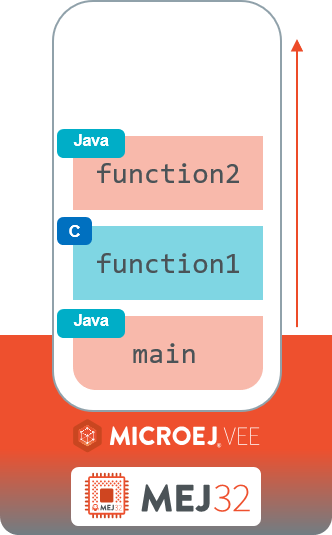
You can notice that, from Core Engine execution point of view, there is no distinction between Java methods and Managed C functions. The execution of the main entry point produces the following stack trace:
Exception in thread "main" java.lang.RuntimeException: Core Engine Stack Trace
   [...]
   at java.lang.RuntimeException.<init>(RuntimeException.java:18)
   at example.JavaCode.function2(JavaCode.java:13)
   at example.JavaCode.function1(Unknown Source)
   at example.JavaCode.main(JavaCode.java:26)
   at java.lang.MainThread.run(Thread.java:856)
   at java.lang.Thread.runWrapper(Thread.java:465)
   [...]
The line example.JavaCode.function1 represents the execution of the Managed C function named function1.
Note
The Core Engine prints Unknown Source because the Wasm file in this example is built without debug information. Embedding debug information using the -g compiler option enables the retrieval of line numbers in C files.
Declare a Wasm Module
To use Managed C, create a Java class that:
Extends
WasmModule.Is declared
final.Optionally carries the
@Aliasannotation with the module name. The SOAR resolves the corresponding.wasmfile from the MicroEJ Classpath by appending the.wasmextension to the alias name. If no@Aliasannotation is present, the simple class name is used.
Drop your Wasm module file into src/main/resources. Let’s assume it is called my_app.wasm.
Add to the desired Java class the @Alias annotation with the module name (e.g. @Alias("my_app")).
Your class should look like the following code:
package com.mycompany;

import ej.lang.Alias;
import ej.lang.WasmModule;

// This Java class is bound to a Wasm module named 'my_app' and
// loaded from the '/my_app.wasm' resource in MicroEJ classpath.
@Alias("my_app")
public final class MyApp extends WasmModule {

}
Your project files should look like the following:
├── src
│   └── main
│       ├── java
│       │   └── com
│       │       └── mycompany
│       │           └── MyApp.java
│       └── resources
│           └── my_app.wasm
To place the Wasm file in a sub-directory, include the relative path directly in the @Alias value.
For example, if my_app.wasm is located under src/main/resources/wasm/:
package com.mycompany;

import ej.lang.Alias;
import ej.lang.WasmModule;

// Loaded from the '/wasm/my_app.wasm' resource in MicroEJ classpath.
@Alias("wasm/my_app")
public final class MyApp extends WasmModule {

}
├── src
│   └── main
│       ├── java
│       │   └── com
│       │       └── mycompany
│       │           └── MyApp.java
│       └── resources
│           └── wasm
│               └── my_app.wasm
Bind a Java Method to a Managed C Function
Once a Java class declares a Wasm module, all Java instance methods and Managed C functions that meet the following conditions are automatically bound:
The Java method is an instance method (not
static).The signature (name, parameters and return type) of the Java method matches with the signature of the Managed C function (see Matching Types).
The Managed C function has been exported by the Wasm module. See
-Wl,--exportlinker option. (Managed C functions declaredstaticcannot be exported as they are only visible in the C file they are declared) [1].
Here is an example:
Java source code (
MyApp.java):package com.mycompany; import ej.lang.Alias; import ej.lang.WasmModule; @Alias("my_app") public final class MyApp extends WasmModule { // Bound to Managed C function 'print(int)' in 'my_app.wasm' module public void print(int c) { System.out.print((char) c); } }
C source code (
my_app.c):// Bound to Java method 'com.mycompany.MyApp.print(int)' extern void print(int c);
The following sections explain how to customize the default binding from the Java code side and from the C code side.
Bind a Managed C Function from Java Code
The @Alias annotation is used to extend the default Java Method to Managed C Function binding from the Java code side.
Call a Managed C Function from Java Code
The most common case is to call a Managed C function from Java code.
For that, the Java method being bound must be:
An instance method (not
static).Declared
native, as it does not include a body.Declared
synchronizedto prevent concurrent execution of Managed C code on the same module instance by default, as stated by the WebAssembly 1.0 specification.
Note
POSIX pthreads are supported through WASI Threads. Threads execute multiple Wasm Module instances that share a common linear memory.
Here is an example:
Java source code (
MyApp.java):package com.mycompany; import ej.lang.Alias; import ej.lang.WasmModule; @Alias("my_app") public final class MyApp extends WasmModule { public static void main(String[] args) { MyApp myApp = new MyApp(); int a = 1; int b = 2; // Call and return result of the "add" Managed C function int r = myApp.add(a, b); System.out.println(a + " + " + b + " = " + r); } public native synchronized int add(int a, int b); }
C source code (
my_app.c):int add(int a, int b) { return a + b; }
You should see the following output when launching the Application:
1 + 2 = 3
Bind a Managed C Function with a Different Name
The @Alias annotation can also bind a Java method to a Managed C function that has a different name.
Provide the C function name as the parameter of the @Alias annotation.
This is especially useful if you want to write a Java method name in camelCase while binding it to a Managed C function name written in snake_case.
Java source code (
MyApp.java):import ej.lang.Alias; import ej.lang.WasmModule; @Alias("my_app") public final class Main extends WasmModule { public static void main(String[] args) { Main myApp = new Main(); int a = 1; int b = 2; // Call and return result of the "do_add" Managed C function System.out.println(a + " + " + b + " = " + myApp.doAdd(a, b)); } @Alias("do_add") public native synchronized int doAdd(int a, int b); }
C source code (
my_app.c):int do_add(int a, int b) { return a + b; }
Bind a Java Method from C Code
The import_module, import_name and export_name C attributes
are used to extend the default Java Method to Managed C Function binding from C code side.
Call a Java Method from C Code
From C code, an extern function can be bound to either:
A Java instance method of the
WasmModulesubclass bound to the same Wasm module.A static Java method of any class.
The import_module attribute
is used when the Java method to be bound belongs to a Java class other than the one bound to the Wasm
module. The module name can be either the fully qualified name of the Java class containing the Java
method (e.g: com.mycompany.MyApp) or the alias name of the @Alias annotation of the class
containing the Java method.
The most common case is to call a static Java method declared in a library from C code.
The corresponding Java class fully qualified name is provided as a parameter of the __import_module__ attribute.
Here is an example with the standard Java Math.max(int,int) method.
C source code (
my_app.c):// Binding to Java static method 'java.lang.Math.max(int,int)' __attribute__((__import_module__("java.lang.Math"))) extern int max(int i, int j);
Use @Alias to Simplify C-to-Java Bindings
The @Alias annotation can be applied to any Java class or method, not only to WasmModule
subclasses. This allows C code to reference a Java class and method using short, C-friendly names
instead of the fully qualified class name and the camelCase Java method name.
Here is an example with a MathUtils utility class:
Java source code (
MathUtils.java):package com.mycompany; import ej.lang.Alias; @Alias("utils") public class MathUtils { /** * Clamps the given value to the range {@code [min, max]}. * * @param value * the value to clamp. * @param min * the lower bound. * @param max * the upper bound. * @return the clamped value. */ @Alias("clamp") public static int clampValue(int value, int min, int max) { if (value < min) { return min; } if (value > max) { return max; } return value; } }
C source code (
my_app.c):// Without @Alias, __import_module__ would require the fully qualified // name "com.mycompany.MathUtils" and __import_name__ would require "clampValue". __attribute__((__import_module__("utils"), __import_name__("clamp"))) extern int clamp(int value, int min, int max); void app_main() { int result = clamp(150, 0, 100); // result == 100 }
Pass the Calling Module as a Parameter
When a Managed C function calls a static Java method, the SOAR can automatically pass the calling
WasmModule instance as an implicit first argument. To enable this, declare the first parameter
of the static Java method as a WasmModule. The C function
signature does not include this parameter — it remains invisible from C.
This allows utility classes that do not extend WasmModule to receive the calling module and
interact with it — for example, to call one of its methods, or to access its
linear memory.
Here is an example where a standalone MessageHandler class calls a method on the module:
Java source code (
MessageHandler.javaandMyApp.java):package com.mycompany; import ej.lang.WasmModule; public class MessageHandler { private static final String[] MESSAGES = { "Success", "Warning", "Error" }; /** * Called from Managed C code when a message is available. * <p> * The {@code module} parameter is automatically injected by the SOAR * and does not appear in the C function signature. * * @param wasmModule * the calling Wasm module, injected by the SOAR. * @param code * the message code. */ public static void onMessage(WasmModule wasmModule, int code) { ((MyApp) wasmModule).displayMessage(MESSAGES[code]); } }
package com.mycompany;

import ej.lang.Alias;
import ej.lang.WasmModule;

@Alias("my_app")
public final class MyApp extends WasmModule {

   public static void main(String[] args) {
      MyApp myApp = new MyApp();
      myApp.appMain();
   }

   public native synchronized void appMain();

   /**
    * Displays the given message.
    *
    * @param message
    *            the message to display.
    */
   public void displayMessage(String message) {
      System.out.println(message);
   }

}
C source code (
my_app.c):// The Java signature has WasmModule as first parameter, but it does not // appear in the C function signature — the SOAR injects it automatically. __attribute__((__import_module__("com.mycompany.MessageHandler"))) extern void onMessage(int code); void appMain() { onMessage(0); // Sends "Success" onMessage(2); // Sends "Error" }
You should see the following output when launching the Application:
Success
Error
Bind a Java Method with a Different Name
The import_name attribute is used when the Managed C function name has a different name from the Java method.
The corresponding Java method name is provided as a parameter of the __import_name__ attribute.
This is especially useful if you want to write a Managed C function in snake case while binding it to a Java method name written in camelCase.
Java source code (
MyApp.java):package com.mycompany; import ej.lang.Alias; import ej.lang.WasmModule; @Alias("my_app") public final class MyApp extends WasmModule { public void javaPrint(int c) { System.out.print((char) c); } }
C source code (
my_app.c):__attribute__((__import_name__("javaPrint"))) extern void c_print(int c);
A Managed C extern function can also be bound to a static native Java method that is an
SNI method implemented in unmanaged C code.
This makes it possible for Managed C code to call unmanaged C code: the Managed C function calls
the Java SNI method via the extern binding, and the SNI method itself is implemented by a
native C function outside the Wasm module.
Java source code (
MyApp.java):package com.mycompany; import ej.lang.Alias; import ej.lang.WasmModule; @Alias("my_app_managed") public final class MyApp extends WasmModule { // static native → SNI method implemented in unmanaged C public static native void javaPrint(int c); }
Managed C source code (
my_app_managed.c):__attribute__((__import_name__("javaPrint"))) extern void c_print(int c);
Unmanaged C source code (
my_app_native.c):#include "sni.h" #include "stdio.h" void Java_com_mycompany_javaPrint(jint c) { putchar(c); }
The export_name attribute is used for the same reason, when the Managed C function implements the code.
Java source code (
MyApp.java):package com.mycompany; import ej.lang.Alias; import ej.lang.WasmModule; @Alias("my_app") public final class MyApp extends WasmModule { public native synchronized void javaPrint(int c); }
C source code (
my_app.c):#include <stdio.h> __attribute__((__export_name__("javaPrint"))) void c_print(int c) { putchar(c); }
Matching Types
Java methods bound to Managed C functions can only use Java base types int, long, float, double as parameters and return types.
Here is the matching table:
C Std Type |
Java Type |
Wasm Type |
|---|---|---|
int32_t |
int |
i32 |
int64_t |
long |
i64 |
float32_t |
float |
f32 |
float64_t |
double |
f64 |
Any pointer |
int |
i32 |
SOAR will trigger an error if Managed C function parameter(s) and return types do not match exactly the Java method parameter(s) and return types.
Access Managed C Memory from Java
The Managed C memory is composed of all static arrays, structures, globals declared in C files, thread stacks and optional heap for dynamic allocations. All these elements are linked to the Wasm module linear memory.
On the Java side, the Wasm module linear memory is accessible via the
getMemory() method inherited from
WasmModule. Call it on the module instance to retrieve the backing
byte[] array.
Here is an example of an instance method in the WasmModule subclass reading the linear memory directly:
C source code (
my_app.c):typedef unsigned char uint8_t; extern void printValues(int ptr, int size); uint8_t array[10] = {1, 2, 3, 4, 5, 6, 7, 8, 9, 10}; void appMain() { printValues((int)&array[0], sizeof(array)); }
Java source code (
MyApp.java):package com.mycompany; import ej.lang.Alias; import ej.lang.WasmModule; @Alias("my_app") public final class MyApp extends WasmModule { public static void main(String[] args) { MyApp myApp = new MyApp(); myApp.appMain(); } /** * Managed C entry point. */ public native synchronized void appMain(); /** * Prints values stored in the linear memory. * * @param ptr * index in the Managed C memory. * @param length * number of bytes to print. */ public void printValues(int ptr, int length) { byte[] memory = this.getMemory(); System.out.println("Memory values from " + ptr + " to " + (ptr + length) + ":"); for (int i = 0; i < length - 1; i++) { System.out.print(memory[ptr + i] + ", "); } System.out.println(memory[ptr + (length - 1)]); } }
You should see the following output when launching the Application:
Memory values from 1024 to 1034:
1, 2, 3, 4, 5, 6, 7, 8, 9, 10
Note
To access the linear memory from a utility class outside the WasmModule subclass, declare
the static Java method with a WasmModule first parameter.
The SOAR automatically injects the calling module instance.
See Pass the Calling Module as a Parameter for a complete example.
Start Function
When a Wasm module declares a start function,
it is automatically executed during the construction of the
WasmModule instance (i.e., inside the WasmModule() constructor).