
Abstraction Layers
Principle
Several Abstraction Layers implement the VG Pack’s Abstraction Layer APIs. Some are generic, and some are VEE Port dependent (more precisely: GPU dependent). The generic modules provide header files to be extended by the specific modules. The generic Abstraction Layer is available on the Central Repository and the specific Abstraction Layers on the Developer Repository.
The following picture illustrates the available Abstraction Layers and their relations for an implementation that uses:
FreeType library for the font renderer and the font layouter in simple layout mode.
HarfBuzz library for the font layouter in complex layout mode.
GPU library symbolizes the library for the drawing of vector paths over a GPU.
The following chapters explain the aim and relations of each Abstraction Layer and library.
Note
It is a simplified view: all sources and headers files of each Abstraction Layer are not visible.
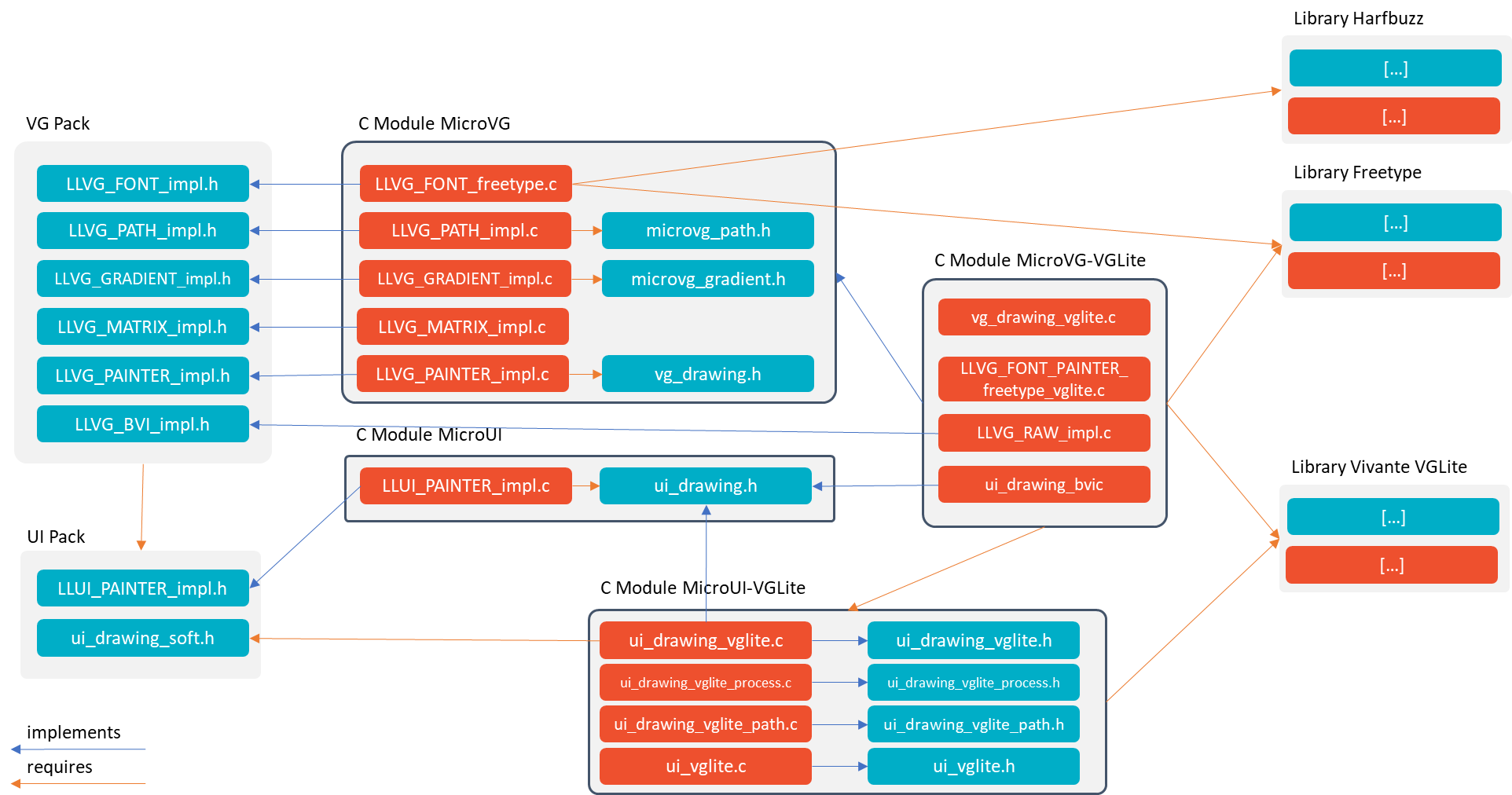
MicroVG Abstraction Layers
UI Pack & MicroUI Abstraction Layers
The UI Pack provides a header file to implement the MicroUI drawings: LLUI_PAINTER_impl.h.
See Abstraction Layers chapter to have more information.
VG Pack
The VG Pack provides a set of header files to implement the MicroVG concepts. The header files are described in the dedicated chapters: Matrix module, Path module, Gradient module, Image module and Font module.
The VG Pack is an extension of the UI Pack. The VG Pack’s header files require the UI Pack’s header files to manipulate the MicroUI concepts. Consequently, the VG Pack must be installed on a VEE Port that fetches a UI Pack.
The VG Pack and its header files are available on the Central Repository: com.microej.pack.vg#vg-pack.
MicroVG Abstraction Layer
Description
This generic Abstraction Layer provides an implementation of MicroVG concepts: matrix, path, gradient and font; respectively LLVG_MATRIX_impl.c, LLVG_PATH_impl_single.c/LLVG_PATH_impl_dual.c, LLVG_GRADIENT_impl_stub.c and LLVG_FONT_impl_freetype.c.
Matrix (see Matrix module’s Abstraction Layer API): a basic software implementation.
Path (see Path module’s Abstraction Layer API): a generic implementation that manages the command buffer’s life cycle and dispatches the command encoding to a 3rd-party header file
vg_path.h.Gradient (see Gradient module’s Abstraction Layer API): a generic minimal implementation that only handles a single color (resulting in filling paths with a solid color). To fully handle linear gradients, the API from
LLVG_GRADIENT_impl.hmust be implemented.Font (see Font module’s Abstraction Layer API): an implementation of vector font over FreeType: open font file and retrieve font’s characteristics.
The MicroVG painter native functions are implemented in
LLVG_PAINTER_impl.cand the drawings are redirected tovg_drawing.h.Image management is too specific to the GPU and is not implemented in this Abstraction Layer.
This Abstraction Layer is available:
on GitHub: AbstractionLayer-VG (see Install From GitHub),
on the Central Repository: com.microej.clibrary.llimpl#microvg.
Dependencies
This generic Abstraction Layer requires some specific modules:
Path and Gradient require an Abstraction Layer specific to a VEE Port (to a GPU format).
Font requires the FreeType library and optionally the HarfBuzz library to manage the complex layout.
Usage
Install the MicroUI Abstraction Layer and follow its implementation rules.
Add all C files in the BSP project.
Configure the options in the header file
vg_configuration.h.To optionally use the ej.microvg.BufferedVectorImage, the support of custom image format is required. As described here, set the define
UI_GC_SUPPORTED_FORMATSto2or more inui_configuration.h.To optionally use a MicroVG vector font ej.microvg.VectorFont in the MicroUI drawings (for instance ej.microui.display.Painter.drawString() ), the support of custom font format is required. As described here, set the define
UI_FEATURE_FONT_CUSTOM_FORMATSinui_configuration.h.Select one of the GPU implementations (see next chapters).
Logs
The Abstraction Layers log the errors and, optionally, some information such as the heap usage:
When the VEE Port Essentials logger is available (
veeport_logger.hin the include path), the logs go through it.Otherwise, the logs go through
printf, as[ERROR - MICROVG] : <message>and[INFO - MICROVG] : <message>.
The error logs are always compiled.
The informative logs are compiled only when VG_LOG_INFO_ENABLED is set to 1 in veeport_configuration.h (0 by default).
Library: FreeType
Description
The FreeType library compatible with MicroEJ is packaged in a C module, available:
on GitHub: VG-FreeType (see Install From GitHub),
on the Developer Repository: com.microej.clibrary.thirdparty#freetype.
This C module provides a fork of FreeType 2.14.1.
Memory Heap Configuration
The FreeType library requires a memory Heap for FreeType internal objects allocated when a font file is loaded (see https://freetype.org/freetype2/docs/design/design-4.html).
The size of this heap depends on the number of fonts loaded in parallel and on the fonts themselves.
This size is defined by VG_FEATURE_FREETYPE_HEAP_SIZE in vg_configuration.h.
All fonts do not require the same heap size. FreeType heap usage can be monitored using the following configurations:
MICROVG_MONITOR_HEAPdefined invg_helper.hVG_LOG_INFO_ENABLEDset to1(see Logs)
Principle
The Application loads a font with ej.microvg.VectorFont.loadFont().
If the resource is internal or external from byte-addressable memory, the FreeType library is configured to read directly from that resource memory section.
Else, if the resource is external from non-byte-addressable memory, the FreeType library is configured to use the external loader to read from that memory.
At this point, the font resources are allocated and the font generic data (including baseline & height metrics) is loaded on the FreeType dedicated heap.
The Application requests metrics.
For generic metrics, already loaded data is directly used (and scaled to the font size used).
For text-dependent metrics: computed by loading metrics of every glyph required by the input string (the glyphs bitmaps are not actually rendered here).
The Application requests drawings.
For every character to draw:
the associated glyph is loaded,
the bitmap is rendered for the given font size and
the character is drawn in the given graphic context.
The Application unloads the font with ej.microvg.VectorFont.close().
Any resource associated with the font is released.
At this point, any attempt to use the font will result in an exception.
Library: HarfBuzz
The library HarfBuzz compatible with MicroEJ is packaged in a C module, available:
on GitHub: VG-HarfBuzz (see Install From GitHub),
on the Developer Repository: com.microej.clibrary.thirdparty#harfbuzz.
This C module provides HarfBuzz 12.3.0 with build scripts patched and additional source files.
The HarfBuzz library requires a memory Heap for HarfBuzz internal objects allocated when a font file is loaded.
The size of this heap depends on the number of fonts loaded in parallel and on the fonts themselves.
This size is defined by VG_FEATURE_HARFBUZZ_HEAP_SIZE_HEAP in vg_configuration.h.
All fonts do not require the same heap size. The MICROVG_MONITOR_HEAP define in vg_helper.h and VG_LOG_INFO_ENABLED set to 1 (see Logs) can be used to monitor the HarfBuzz heap evolution.
FreeType and HarfBuzz libraries are not sharing the same heap, but this could easilly be done by updating ft_system.c and hb-alloc.c files.
VGLite Abstraction Layer
Overview
This Abstraction Layer is a specific implementation of the VG Pack drawings over the official Vivante VGLite library (that targets some GPU with vector graphics acceleration):
It implements the MicroVG API
LLVG_impl.hinLLVG_impl_vglite.c.It implements the MicroVG API
LLVG_GRADIENT_impl.hinLLVG_GRADIENT_impl_vglite.c.It implements the MicroVG API
vg_drawing.hinvg_drawing_vglite.c.It implements the MicroVG API
vg_path.hinvg_path_vglite.c.It implements the MicroVG Image management (draw a compile-time image, create a BufferedVectorImage, etc.) in
vg_drawing_vglite_image.c.It provides an implementation of MicroVG drawings to the MicroVG BufferedVectorImage:
vg_drawing_bvi.c.It also implements MicroUI drawings to the MicroVG BufferedVectorImage:
ui_drawing_bvi.c.
The implementation requires:
the concepts of the MicroVG Abstraction Layer,
the concepts of the VGLite Abstraction Layer of the UI Pack,
the FreeType library,
the Vivante VGLite library.
This Abstraction Layer is available:
on GitHub: AbstractionLayer-VG-VGLite (see Install From GitHub),
on the Developer Repository: com.microej.clibrary.llimpl#microvg-vglite.
Warning
The library must be patched to be compatible with the VGLite Abstraction Layer of the UI Pack. Consult its ReadMe file for more information.
Usage
Install the VGLite Abstraction Layer of the UI Pack and follow its implementation rules.
Install the MicroVG Abstraction Layer and follow its implementation rules.
Add all C files in the BSP project.
Check the port by running the
vgvalidation as described in the VEE Port project template
NemaVG Abstraction Layer
Overview
This Abstraction Layer is a specific implementation of the VG Pack drawings over the official Think Silicon Nema VG library (that targets some GPU with vector graphics acceleration):
It implements the MicroVG API
vg_drawing.hinvg_drawing_nema.c.It implements the MicroVG Image management (draw a compile-time image, create a BufferedVectorImage, etc.):
vg_drawing_nema_image.c.It provides an implementation of MicroVG drawings to the MicroVG BufferedVectorImage:
vg_drawing_bvi.c.It also implements MicroUI drawings to the MicroVG BufferedVectorImage:
ui_drawing_bvi.c.
The implementation requires:
the concepts of the MicroVG Abstraction Layer,
the concepts of the NemaGFX Abstraction Layer of the UI Pack,
the FreeType library,
the Think Silicon NemaVG library.
This Abstraction Layer is available:
on GitHub: AbstractionLayer-VG-NemaVG (see Install From GitHub),
on the Developer Repository: com.microej.clibrary.llimpl#microvg-nema.
Usage
Install the NemaGFX Abstraction Layer of the UI Pack and follow its implementation rules.
Install the MicroVG Abstraction Layer and follow its implementation rules.
Add all C files in the BSP project.
Check the port by running the
vgvalidation as described in the VEE Port project templateAdd the defines
RESX(== LCD width) andRESY(== LCD height) invg/inc/vg_configuration.hor in the C project global options (used to initialize the Nema VG library, seenema_vg_init()).
Compatibility
The compatibility between the components (Packs, Abstraction Layers, C modules, and Libraries) is described in the Release Notes.
Install From GitHub
The sources of each Abstraction Layer are also available on GitHub, one repository per Abstraction Layer.
Each version is a tag of its repository, named after the version (for instance 8.0.3).
Abstraction Layer |
GitHub repository |
|---|---|
MicroVG |
|
VGLite |
|
NemaVG |
The FreeType and HarfBuzz C modules are also available on GitHub: VG-FreeType and VG-HarfBuzz. These repositories hold the MicroEJ support files and patches only: the README of each one describes how to get the library source and apply the patches.
To add an Abstraction Layer to a BSP project managed with git, add its repository as a git submodule, then select the version:
git submodule add https://github.com/MicroEJ/AbstractionLayer-VG.git <path/in/bsp>/microvg
git -C <path/in/bsp>/microvg checkout 8.0.3
git add <path/in/bsp>/microvg
Then follow the usage steps of the Abstraction Layer, as with the version fetched from the MicroEJ Repository. Refer to Release Notes to select the version that matches the VG Pack.